Updated 15 September 2026. This version replaces desk research with 12 recorded hands-on sessions run against an identical scenario between 10 and 13 September 2026. Scores, prices and capability flags come from The OKR Software Benchmark (release in Q3 2026, regenerated 15 September) with last-verified dates. Screenshots are from the sessions.
Disclosure: I'm the CEO of Tability, one of the platforms below, and it ranks first on our own benchmark. Discount that as you see fit. It's why the scenario, the scores, the screenshots and the places Tability loses are all published here, and why the benchmark scores categories where Tability doesn't come first.
The short answer. After running the same 30-minute scenario on all twelve, Tability (4.5/5) ranks first. It's the only platform where dashboards, governance and AI didn't need assembling. Perdoo (4.0) is the best structured alternative and Profit.co (3.5) the third option for teams that also want employee performance management. OKRs Tool is the cheapest real option at $49/month flat, and Teamflect has the most generous free tier at 10 users. The full reasoning, the screenshots and the failures are below.
There are a fair number of "best OKR software" listings written by people who never really tried the tools they're writing about. They describe features from a checklist perspective (does this exist in the docs?) and skip the part that matters (is this easy to do?). That isn't very helpful, because most OKR features are table stakes now. The real difference is in how they're implemented – not whether they exist.
To understand that difference, I spent a few days signing up to the most popular OKR platforms, creating the same sales plan on each one, and then hunting for the things a mid-size or enterprise buyer actually needs: scalability and governance, time-to-value, AI readiness, reporting and conversations, integrations and data connectors, and performance.
That's twelve platforms tested. Nine of them are worth an enterprise shortlist, three I cut after testing, and one I couldn't get access to and won't pretend otherwise.
Who this guide is for
The goal isn't to test everything under the sun. It's to look at the best options for mid-size and large teams that want to build a real habit around their goals.
This post is for teams that:
- Have at least 50 people tracking goals on a weekly basis
- Need support for multiple layers of OKRs
- Want visibility across the whole organisation
- Care about accountability more than they care about a pretty tree view
It isn't for teams that are just getting started, or that aren't willing to push people to do the weekly check-ins. If you're still evaluating OKRs, a spreadsheet template is more than enough. Deploying a complete platform too early can discourage a team faster than it helps.
What's not on this list, and why
Some comparison posts have 25+ tools listed. Not here.
I only wanted to consider solutions that treat goals as a first class citizen. As a result, 3 categories are out by principle:
HR suites where goals are a module. Lattice, Leapsome, Betterworks, 15Five, Synergita. These are performance management platforms with a goals tab. They're fine if HR owns your goal process and you want OKRs to feed 1:1s and reviews. They fall over the moment a strategy or ops team wants a leadership cockpit, and their goal features ship slower because goals aren't where the roadmap goes. Linking OKRs to compensation is also a bad idea on its own merits, which is a separate argument.
Project management tools with a goals feature. Asana, ClickUp, monday.com, Businessmap, Craft.io. Issue trackers that grew a goals object. They're good at work and poor at outcomes, and the goal layer is always the weakest part of the product because it has to be. If your team already lives in Jira, Oboard and Atlassian Goals are the honest versions of this idea and both are tested below.
Multi-year strategic planning software. OKR platforms belong to the strategy execution space where speed of iteration matters more than having a perfectly crafted 5-year plan. But if this is what you're after you'll find great options in our best strategic planning software guide.
Knowledge bases dressed up as strategy systems. Notion, Coda, and the spreadsheet template you might already be using. A Notion OKR setup works beautifully up to about 10 people and then becomes somebody's unpaid second job. No auto-update from your data, no alignment view, no audit trail, and no answer when the CFO asks who changed the target.
None of that is a knock on those products. They do their primary job extremely well. It's a knock on putting them in an enterprise OKR comparison when goals are an afterthought for them. If you want goals at the centre, you need a platform designed with that in mind.
How I tested 12 OKR platforms
I went into each evaluation with the same structure. One 30-minute session per platform, timed from signup, starting with a quarterly plan for a sales team: one objective, three key results, one initiative.
Objective: Build a predictable sales pipeline
KR1: Increase qualified demos from 40 to 60 per month
KR2: Increase demo-to-opportunity conversion from 12% to 18%
KR3: Reduce lead response time from 18 to 6 hours
Initiative: Launch a new lead routing workflow
That alone is a decent read on time-to-value. Is it quick to add a simple set of OKRs, or do you go through complex forms to get started? Can you import your data, or do you add every objective and key result by hand? This doesn't matter much if you're a team of five. If you're onboarding 100+ people it gets expensive fast.
Those three key results are also deliberately awkward. One starts above zero, one is a percentage, one goes down and is measured in hours. Between them they tripped eight of the twelve: Oboard, Teamflect, OKRs Tool, Profit.co, Atlassian Goals and Cascade fought the units or the setup, Range couldn't express a starting value at all, and Rhythms modelled the third key result as an increase.
Then I looked at five different things on every platform:
- How check-ins work, and where reminders are configured
- Reporting views, and how you compare the progress of your teams
- Integrations, and whether a data connector can update a key result
- Governance, notifications, and who can create and edit OKRs
- AI capabilities, and whether there's an MCP server
You can easily replicate the test by copying the block and running it yourself. Thirty minutes tells you more than anything I've written here.
What this test is not. This is not a reliability study, a security review, or an assessment of support. Tasks varied with what each trial exposed. Where I didn't get to test something, the tables say so rather than scoring a gap I couldn't verify.
What actually matters for enterprise OKRs in 2026
Core OKR features are now table stakes. Every serious platform has objectives, key results, check-ins, confidence, alignment and a tree view. Scoring those is scoring a commodity.
What separates platforms at scale is how fast you can onboard 400 people and start blending the new platform within your existing workflows. Six things to test:
Time to value. How long does it take to go from signup to a published plan with three tracked key results and a reminder cadence. Is there an importer, or is every goal a form?
AI and agent readiness. MCP server, a native AI mode that reads your own data, scheduled prompts and reports, and whether agents can own outcomes. This might be new in 2026 but I weight it heavily.
Claude and ChatGPT are rapidly gaining traction in work environments and they're likely to become one of the primary ways people interact with their goals. It's much easier for an executive to ask for a summary of progress in Claude than to remember where a report lives.
Agents are on the same trajectory, and it's not hard to see a future where agents need their own reporting. A goal system that can't be read from outside itself, and can't model a non-human owner, is one you'll be replacing inside two years.
Scale and governance. SSO and SCIM as a baseline, then control over who creates and edits OKRs, audit trails, notification controls, group permissions.
Reporting and conversation. Out-of-the-box team comparison and drill-down, and whether comments are first-class or greyed out.
Automation and integrations. Data connectors on key results, API, webhooks, initiative sync to project tools.
Performance. It isn't a scored criterion in the benchmark, and it's binary in practice. A slow app doesn't lose points, it loses the rollout. It's flagged every time it showed up.
The scores in this article are the published benchmark scores, computed from the criteria and weights at tability.io/compare/methodology. I haven't invented a private scoring model for this post.
What to look for in an enterprise OKR platform
The criteria above are the lens. This is the checklist to take into a demo, with the question that exposes each one in under a minute.
Fast setup for many teams
- Look for: an importer that takes a spreadsheet or pasted text and builds several team plans at once, with start values and units detected.
- Ask in the demo: "Here's our sales plan as text. Get it into the product." Time it. If it's three forms per key result, multiply by your team count.
AI that reads your data, not just the docs
- Look for: an AI mode inside the product that answers "which goals need attention" from your own workspace, an MCP server so Claude or ChatGPT can query the same data from outside, and scheduled reports that write themselves. Which platforms have which is scored here.
- Ask in the demo: create one objective, then ask the platform's AI to summarise it. Two of the twelve I tested passed this on the standard prompt. Most couldn't run it at all.
Alignment you can see without configuring it
- Look for: a strategy map that shows how a team's key result rolls up to a company objective, generated from the plan structure rather than drawn by hand.
- Ask in the demo: "Show me the map for a plan you didn't prepare for this call."
Reporting that exists before you build it
- Look for: the plan itself as a dashboard, a presentation mode for leadership, and a per-person view for managers. Different stakeholders need different views, and the question is how many of those views come with the product. Cascade's generated executive review and Tability's scheduled prompts are two versions of one-click reporting from the sessions. Three of the twelve I tested could show me one person's goals.
- Ask in the demo: "It's Thursday, the leadership meeting is tomorrow. What do I put on the screen?" Then: "Pull up one of my direct reports."
Initiatives tied to key results
- Look for: initiatives that sit under the key result they support, with owners, statuses and a board, and syncing from your project tool so the work doesn't get logged twice.
- Ask in the demo: "Three weeks from now, how do I answer 'what are we doing about the demos number' without asking anyone?"
Permissions that scale
- Look for: SAML SSO and SCIM as the baseline, then control over who can create OKRs, per-plan edit permissions, audit history, and IP allowlisting if your security team requires it. SCIM was documented on 7 of the 12 platforms I tested. Creation restrictions on 2. The enterprise security comparison shows who ships what before you send the RFP.
- Ask in the demo: "Stop me creating a plan." If they can't, forty teams will each have their own idea of what an objective is by week three.
Connectors on the key result, not just the app
- Look for: data connectors that update a key result from Salesforce, a warehouse or a Jira query on a schedule, plus an API and webhooks for anything you build yourself. Six of the twelve I tested could do this. The other six update by hand.
- Ask in the demo: "Connect this key result to a live number." Then ask how often it refreshes and whether a human still gets prompted to add context.
All 12 OKR platforms
Overall benchmark score out of 5. Review counts in brackets.
Prices verified against live vendor pages on 15 September 2026, except Weekdone (vendor page erroring, figure unconfirmed). Profit.co, Cascade and Rhythms don't publish pricing, so those are labelled estimates. For what each platform costs at 25, 100, 500 or 2,000 seats, see cost by company size.
Two things about that table.
The review scores all sit between 4.1 and 4.8 and tell you almost nothing. The counts tell you a lot: Perdoo has 502, OKRs Tool has 7, Mooncamp's Gartner figure is two people. Aggregate ratings measure satisfaction among people who already chose the tool. They don't measure fit for a rollout.
On pricing, 13 of the 20 platforms in the benchmark publish USD pricing and 6 are quote-only: Workboard, Profit.co, Rhythms, Cascade, Jira Align and Leapsome. Every major free plan caps at 12 seats or fewer, so a free tier is a way to trial, not a way to run 50 people.
Tability – 4.5/5
Disclosure: our company · Full benchmark profile · tability.io
Best for: mid-market and enterprise teams that want the fastest time-to-value for OKRI and KPIs, with built-in dashboards and AI in the workflow.
Not for: HR-led rollouts, employee performance management.
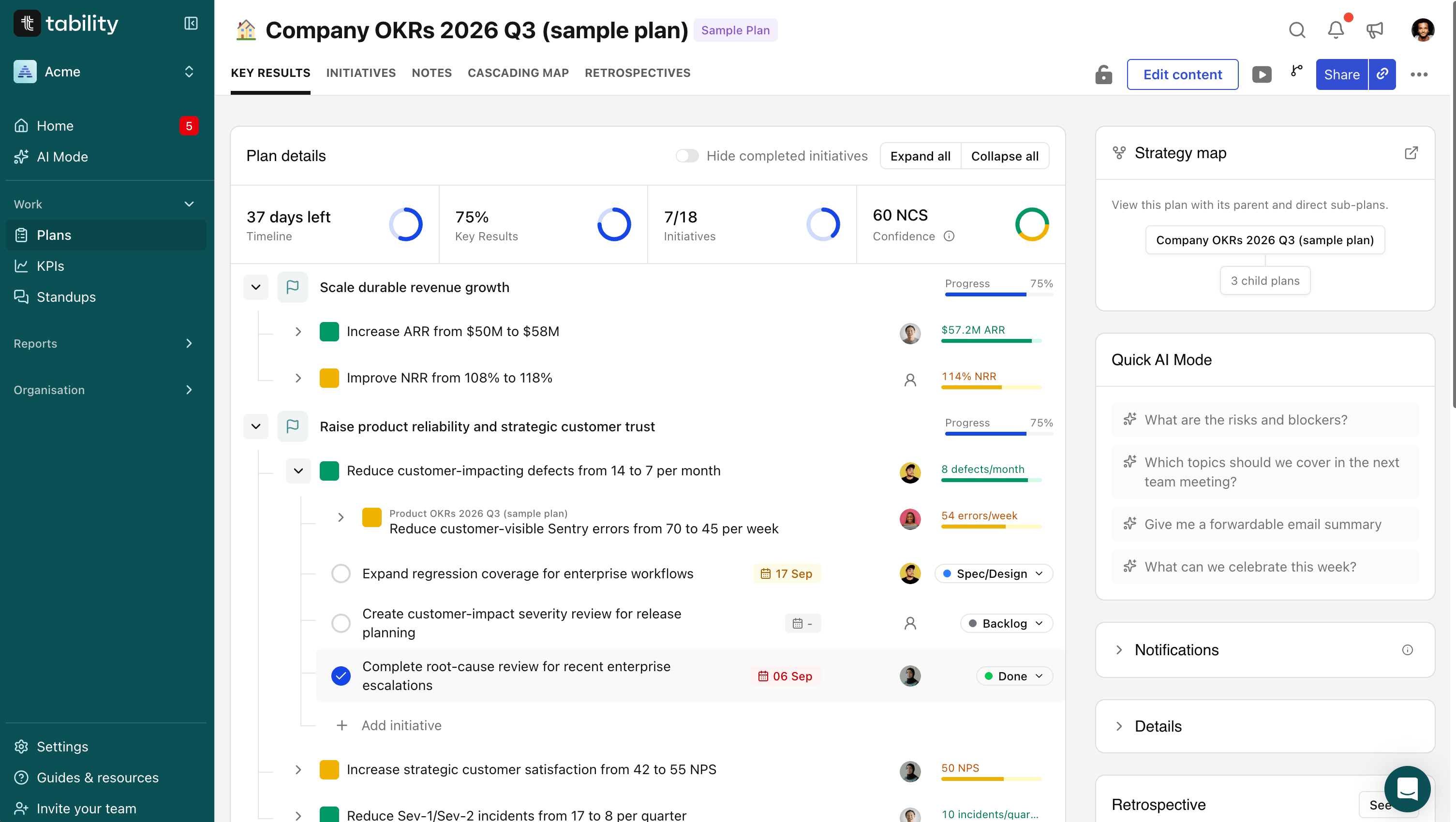
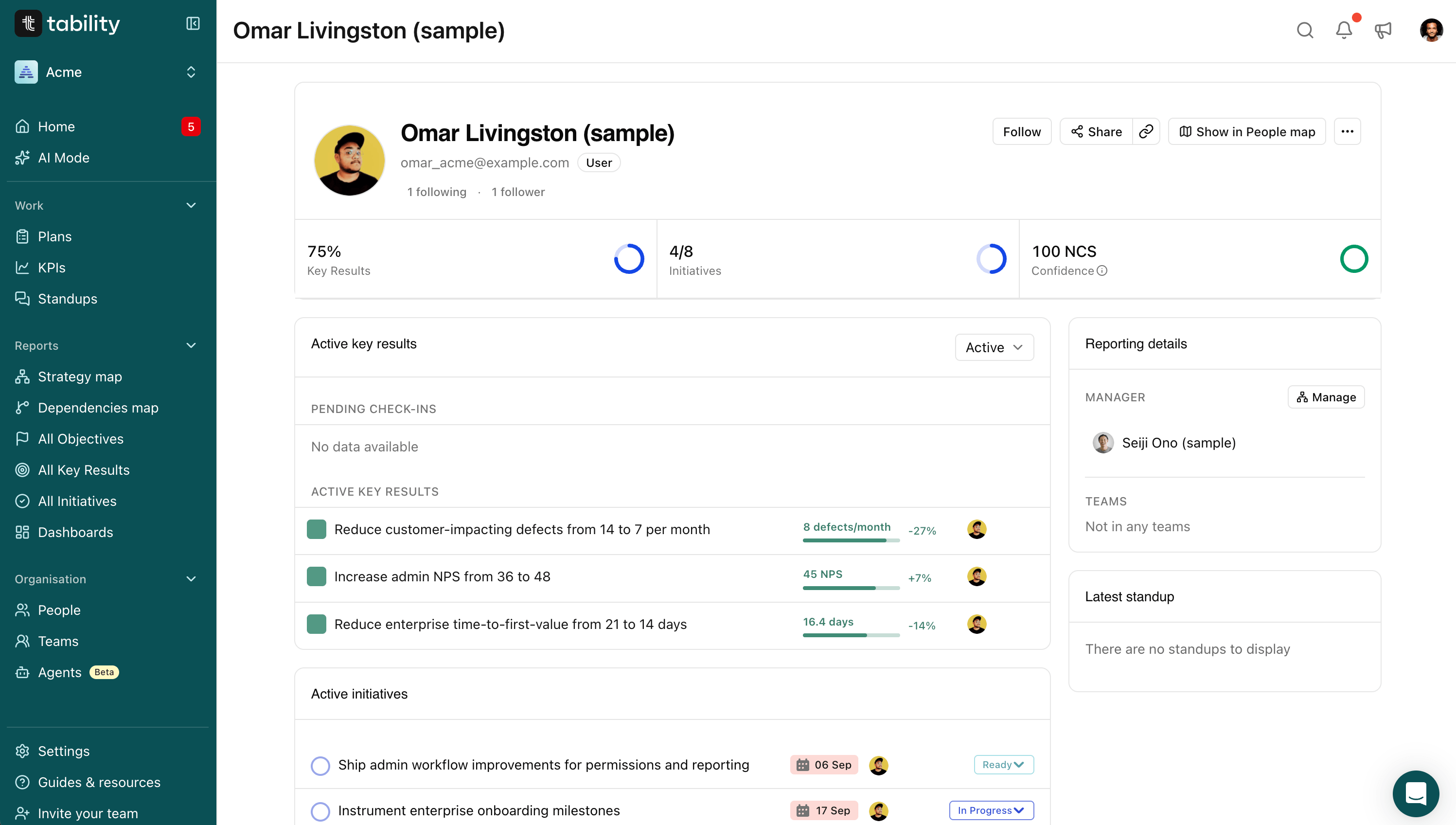
Overview: Tability is our OKR platform. We built it with ease of use and scale in mind, because OKRs can feel like extra reporting to the people doing the work, and a platform's first job is to stay out of the way. What stands out about Tability is how little you have to assemble: the plan is the dashboard, cadence and permissions are decided when you create it, and the AI works across the product rather than sitting in a chat window. The trade-off is scope. We don't do performance management, and the HRIS side is thin. Read this profile with my bias in mind and check it against the ones below.
Strengths
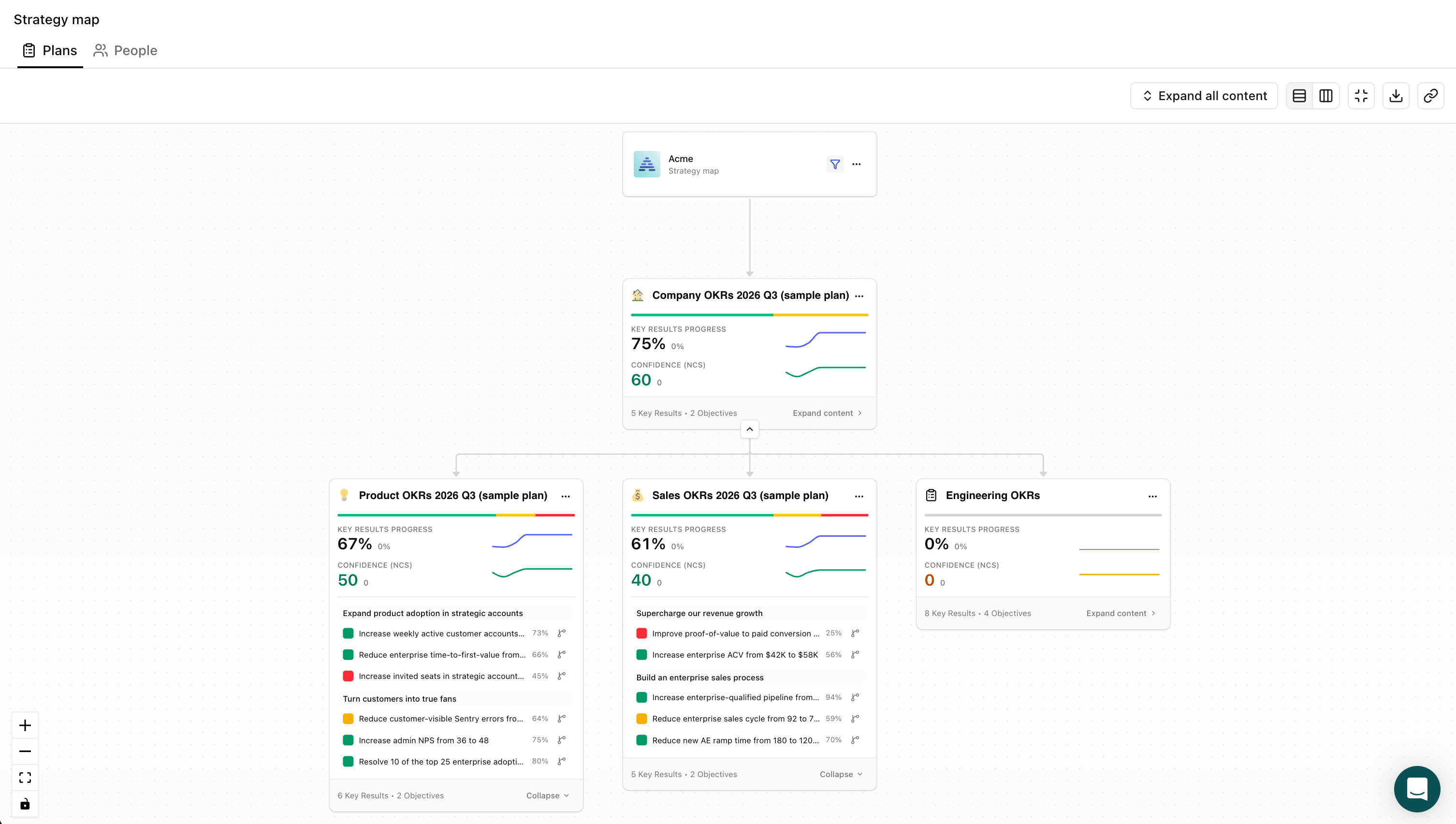
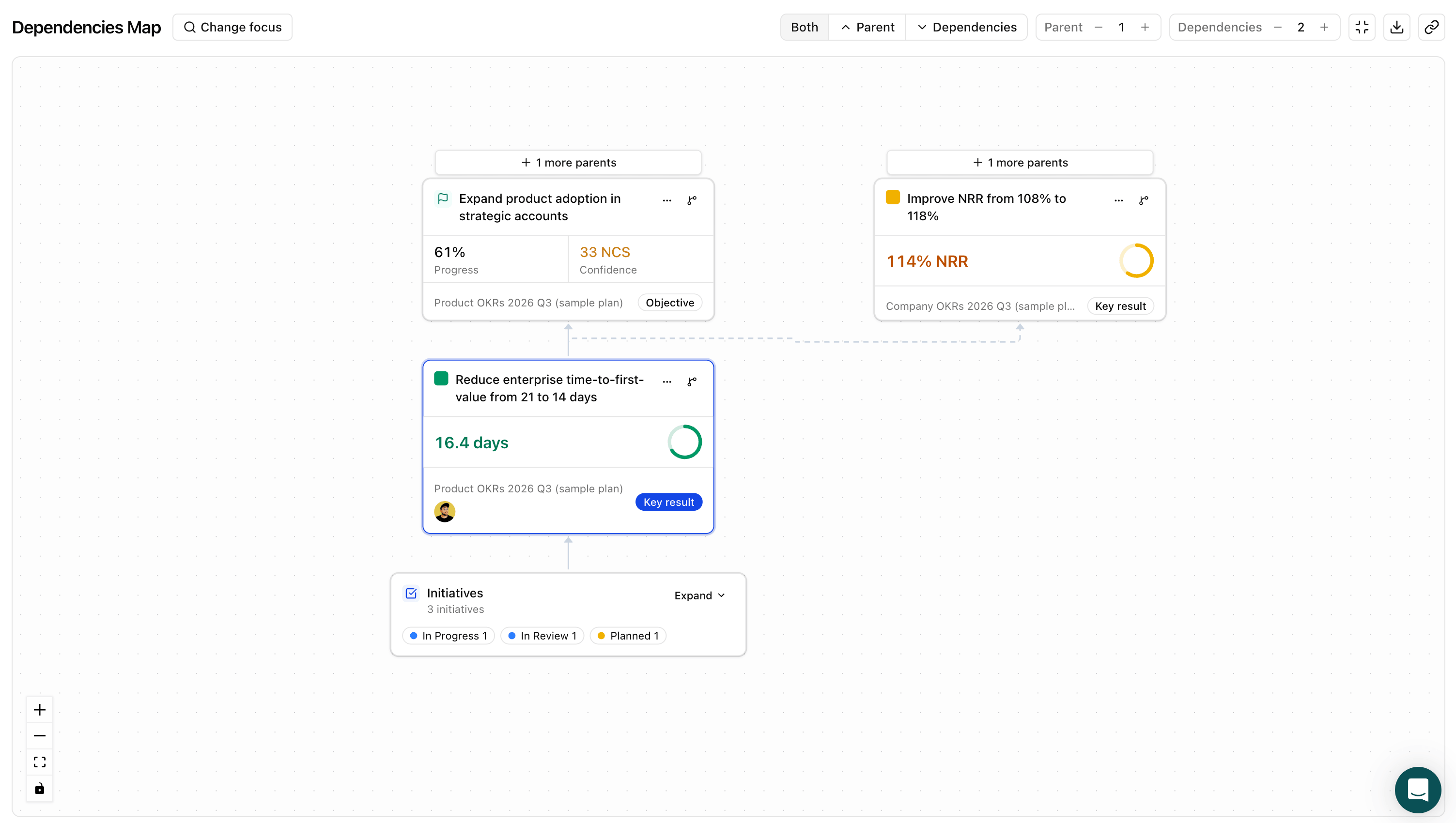
- The plan is the dashboard. Presentation mode, strategy map, dependencies map and Workspace Insights come without building anything.
- Governance built for a rollout: plan creation restricted to owners and admins, per-plan editing permissions, a dedicated IT Admin role, SAML SSO and SCIM for Entra ID and Okta, IP allowlisting, audit history
- Hosting in the EU, Australia and the US.
- Measurement that fits the goal: start-to-target, stay above or below a threshold, milestone counts, rollups from contributing key results, and an optional KPI module for ongoing metrics.
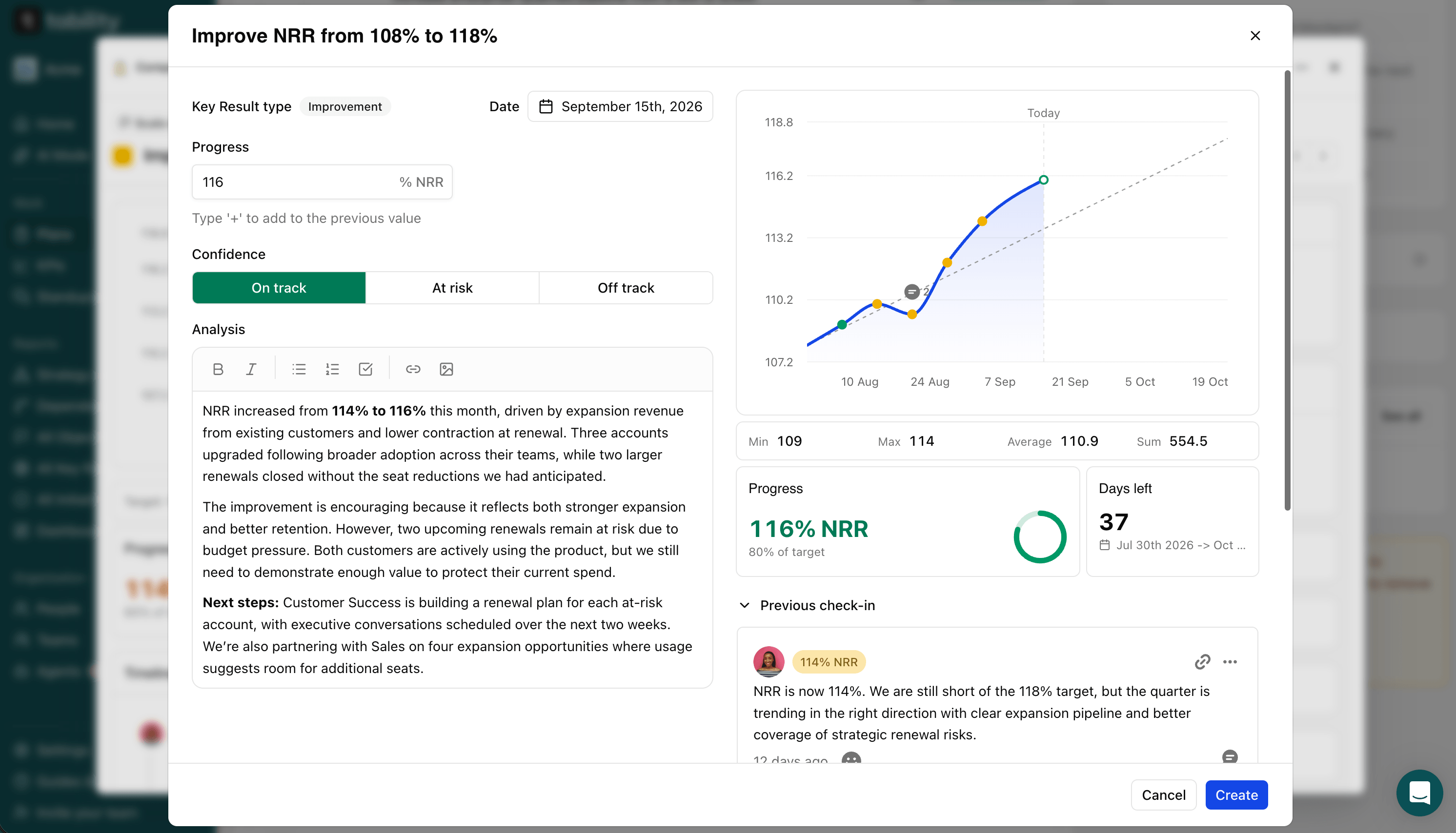
- AI across the product rather than one chat door: MCP server, AI mode that lets you talk to your data in-app, coaching on plan quality before you publish.
- Serious initiative-tracking module allowing you to use the OKRI approach and map the work in progress against each key result.
- KPI supported as a separate module
- Data connectors to Salesforce, HubSpot, Amplitude, Power BI, Tableau, BigQuery, PostgreSQL and JQL issue counts, refreshed daily or weekly. Initiatives sync from Jira, Linear, Asana and ClickUp.
- Pricing scales really well with 2 read-only seats offered per Premium seat purchased
- SOC2 and GDPR compliant
Where it falls short
- No free plan.
- No performance management and limited HRIS integrations, so if goals feed reviews you'll need to pair it with an HR platform.
- Tability limits customisation on purpose. Some design decisions are made to save you time instead of letting you create hundreds of different custom fields.
Unique features. Things I found on Tability and on two or fewer other platforms.
- Multi-team import from one spreadsheet. Nowhere else in the test.
- Scheduled prompts that draft a recurring business review from live data and send it to named recipients daily, weekly, monthly or quarterly. Nowhere else.
- Agent Workforce Manager (open beta): an AI manager assigned to a goal, with its outputs and blockers tracked in the same reporting as the humans. The only platform scoring above 2 on in-product agents.
- Net confidence score, green minus red as a percentage, one number to compare team health across a company.
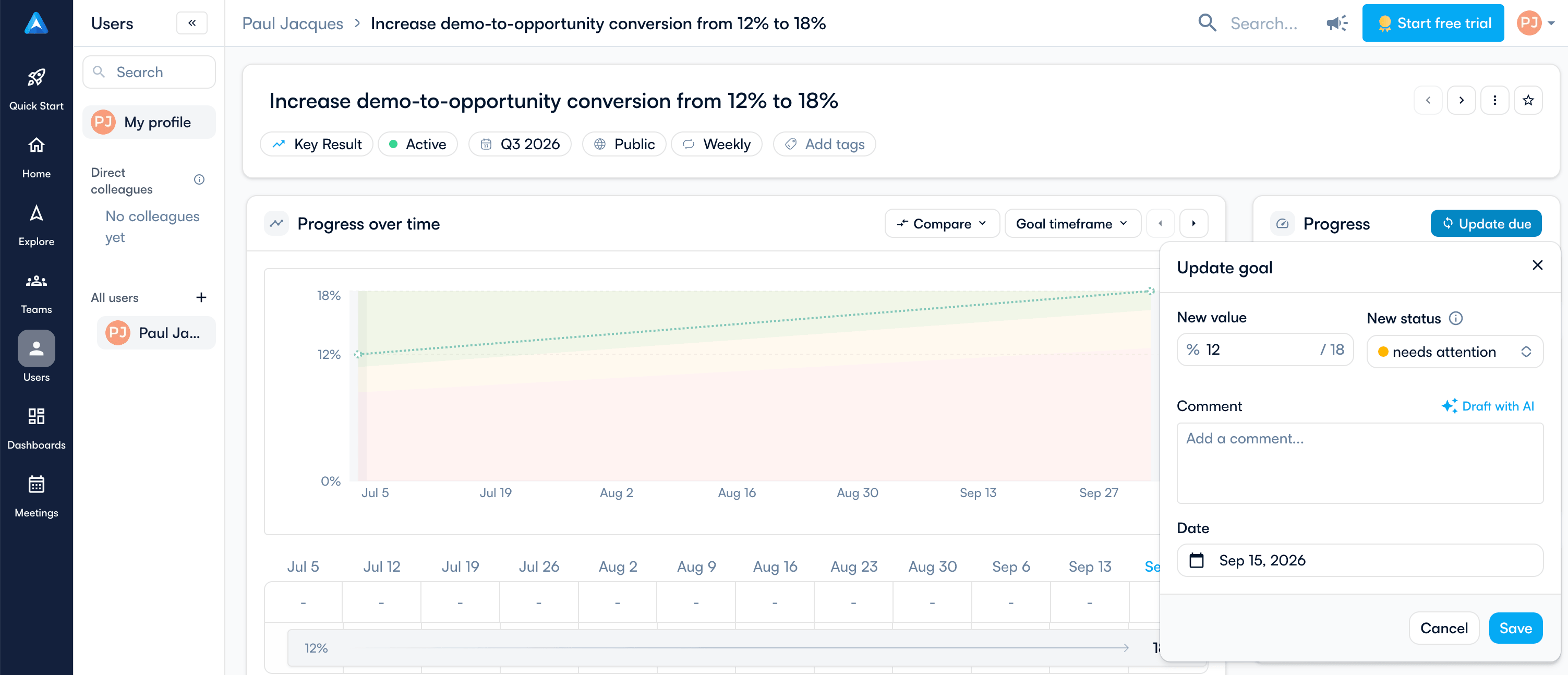
- A direct-reports view (shared only with Perdoo and Weekdone) and admin control over who creates OKRs (shared only with Weekdone).
Core screenshots
Pricing
- $6/user/month Basic, $10 Premium, annual ($7 and $12 monthly).
- Premium includes two free read-only seats per paid seat.
- Enterprise is custom. No free plan, 14-day trial.
Perdoo – 4.0/5
Full benchmark profile · perdoo.com
Best for: teams looking for structured OKRs with KPI support.
Not for: teams needing ready-made leadership dashboards or advanced governance permissions.
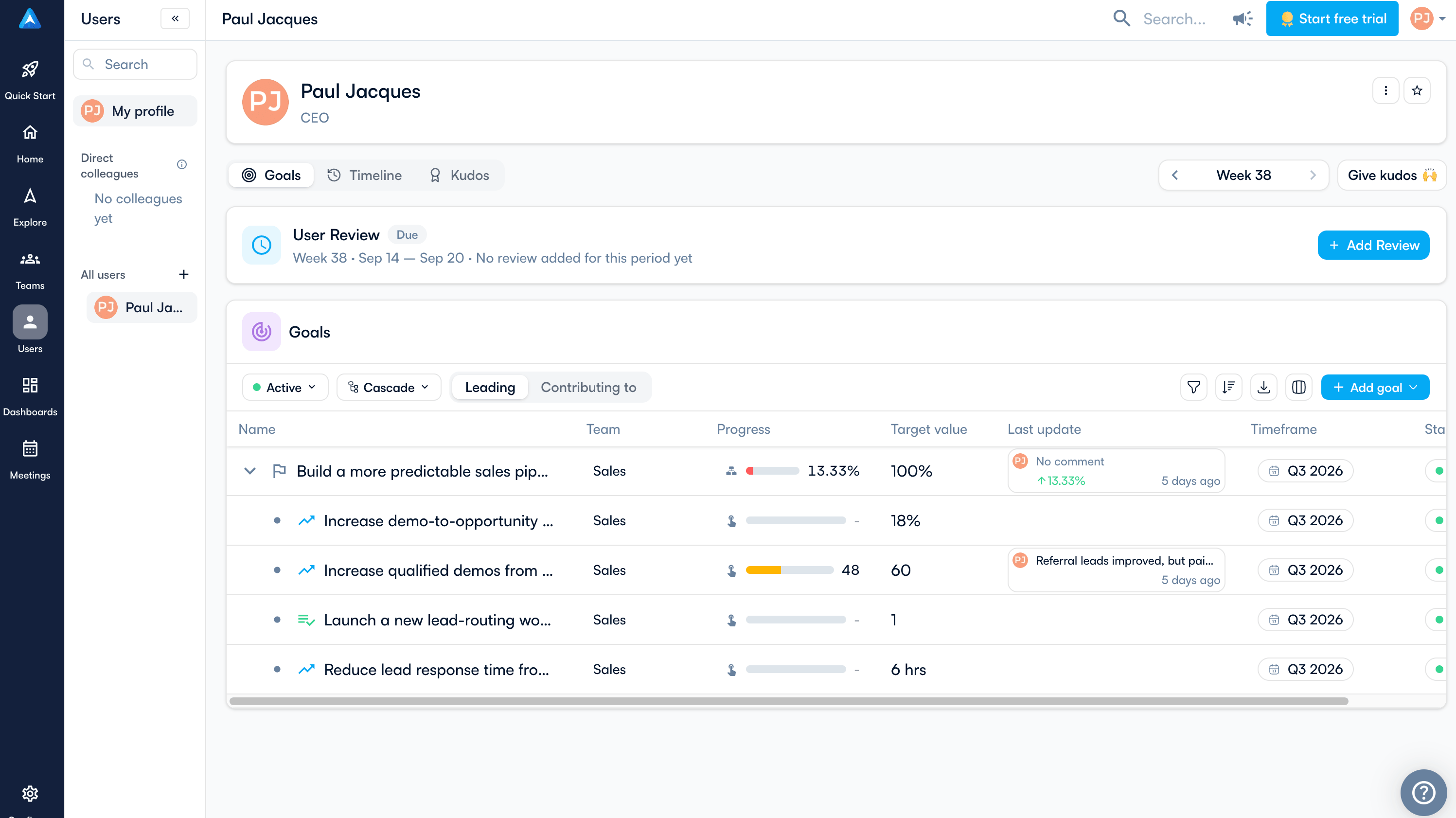
Overview: Perdoo is an OKR platform built around a structured cascade from company goals down to teams, for organisations that want discipline in their framework more than flexibility. What stands out about Perdoo is how quickly you get going: the text importer parsed my whole scenario in one go, and the per-person dashboards give you a way to read the org that most of this field lacks. Where it left me wanting was leadership reporting. The numbers come first, the comments come last, and the dashboards are yours to build.
Strengths
- One of the fastest setups in the benchmark, with targets parsed correctly from plain text.
- A dashboard for every person showing their OKRs, which most of this field is missing.
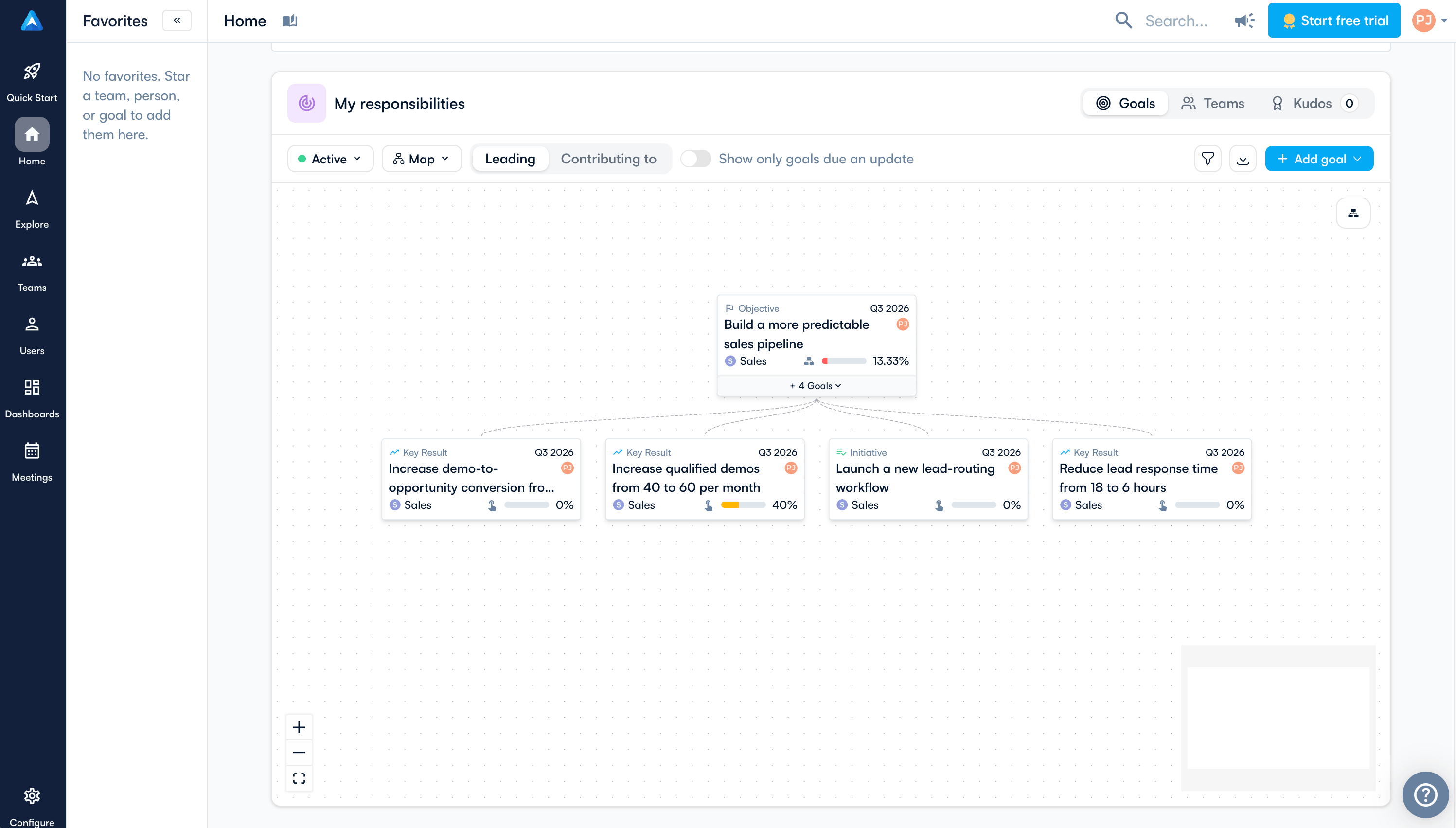
- Goal tree with dependencies and a KPI board.
- Initiatives are first-class, with a documented warning when a key result you're writing is really an initiative.
- MCP server behind ChatGPT and Claude apps, an open API, and connectors that reach into HRIS territory with BambooHR, Factorial and Azure AD.
Where it falls short
- In-app AI stops at the importer. A workspace-aware assistant is documented as coming.
- Few dashboards out of the box, no ready-made view of what's red, and no presentation mode I could find.
- Goal titles ellipse on a laptop in Explore view, which makes list views hard to read.
- Enterprise controls are thin beyond SSO and domain acceptance: no control over who creates OKRs, no notification management, no IP restrictions.
- No monthly billing.
Core screenshots
Pricing
- Free to 5 users. Premium $9/user/month, Supreme $11, annual or quarterly only, minimum 5 paid seats.
Profit.co – 3.5/5
Full benchmark profile · profit.co
Best for: OKRs, performance management and tasks under one contract, with patience to configure it.
Not for: teams that want something navigable without training, or published pricing.
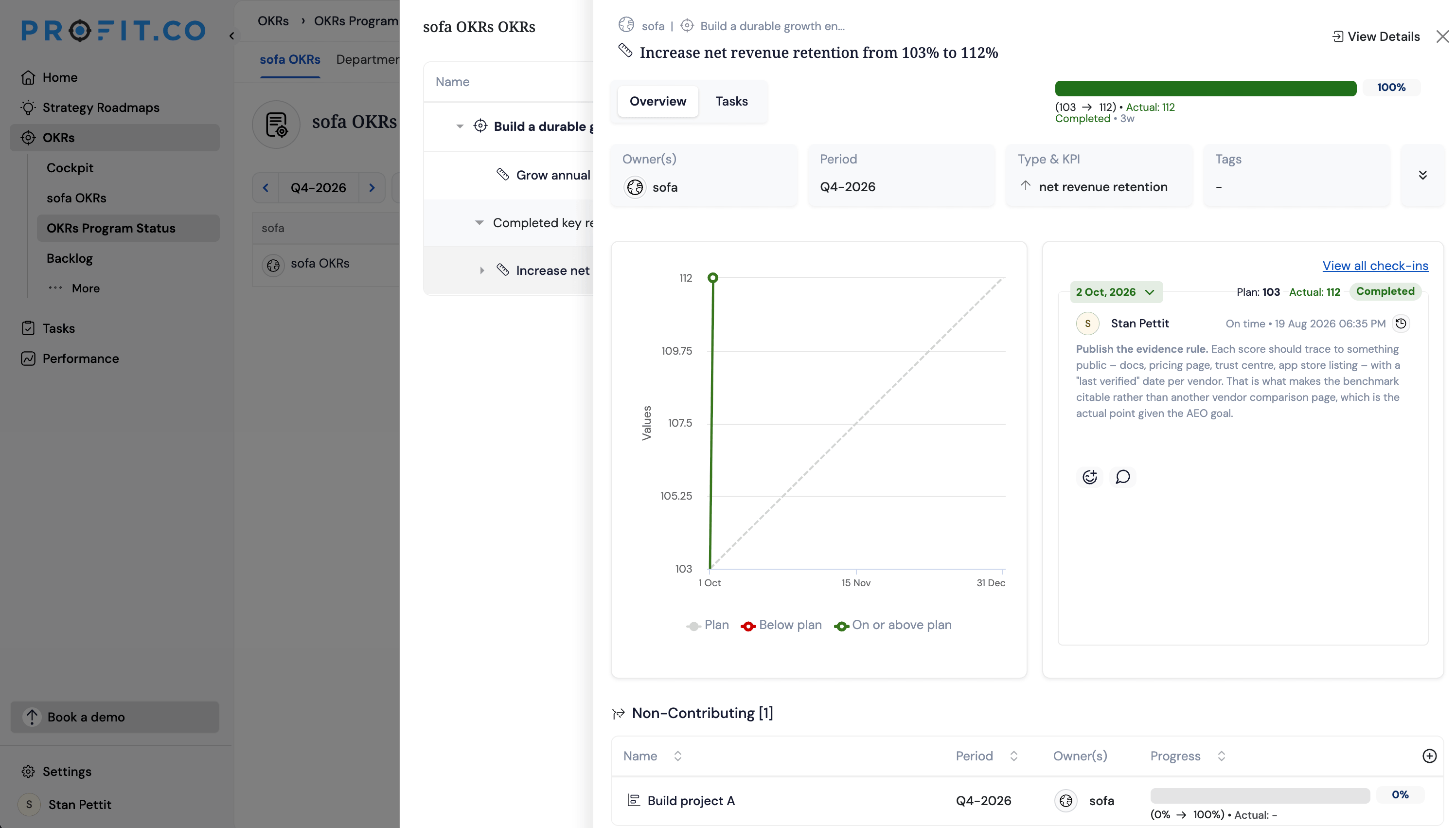
Overview: Profit.co is an all-in-one platform that bundles OKRs with performance management, tasks and a large integration catalogue, for organisations that want one system for everything and have an admin who'll configure it. What stands out about Profit.co is depth: the check-in worked out for itself that I was 14.3% behind plan, and the enterprise controls and connectors go further than anything else I tested. What it costs you is time. Every key result is a KPI you define first, the interface is busy, and I came away thinking of it as an advanced spreadsheet with a serious back end.
Strengths
- Smart check-in confidence: the confidence is adjusted automatically based on the expected progress.
- Comments support audio and video.
- The deepest enterprise controls I tested: user access and email domain restrictions, granular roles, public API and webhooks.
- A 21-connector catalogue from Slack and Jira to Snowflake, BigQuery and Tableau. First in the benchmark for Salesforce shops.
- Performance management and a task module in the same system.
- MCP connector for Claude and ChatGPT documented.
Where it falls short
- Every key result is a KPI you must define first, so creation is slow and form-heavy. No importer.
- Tasks and initiatives are separate systems, and my initiative landed as a non-contributing key result.
- Reporting reads like an advanced spreadsheet. Presentation mode is a slide-deck download, not a view in the app.
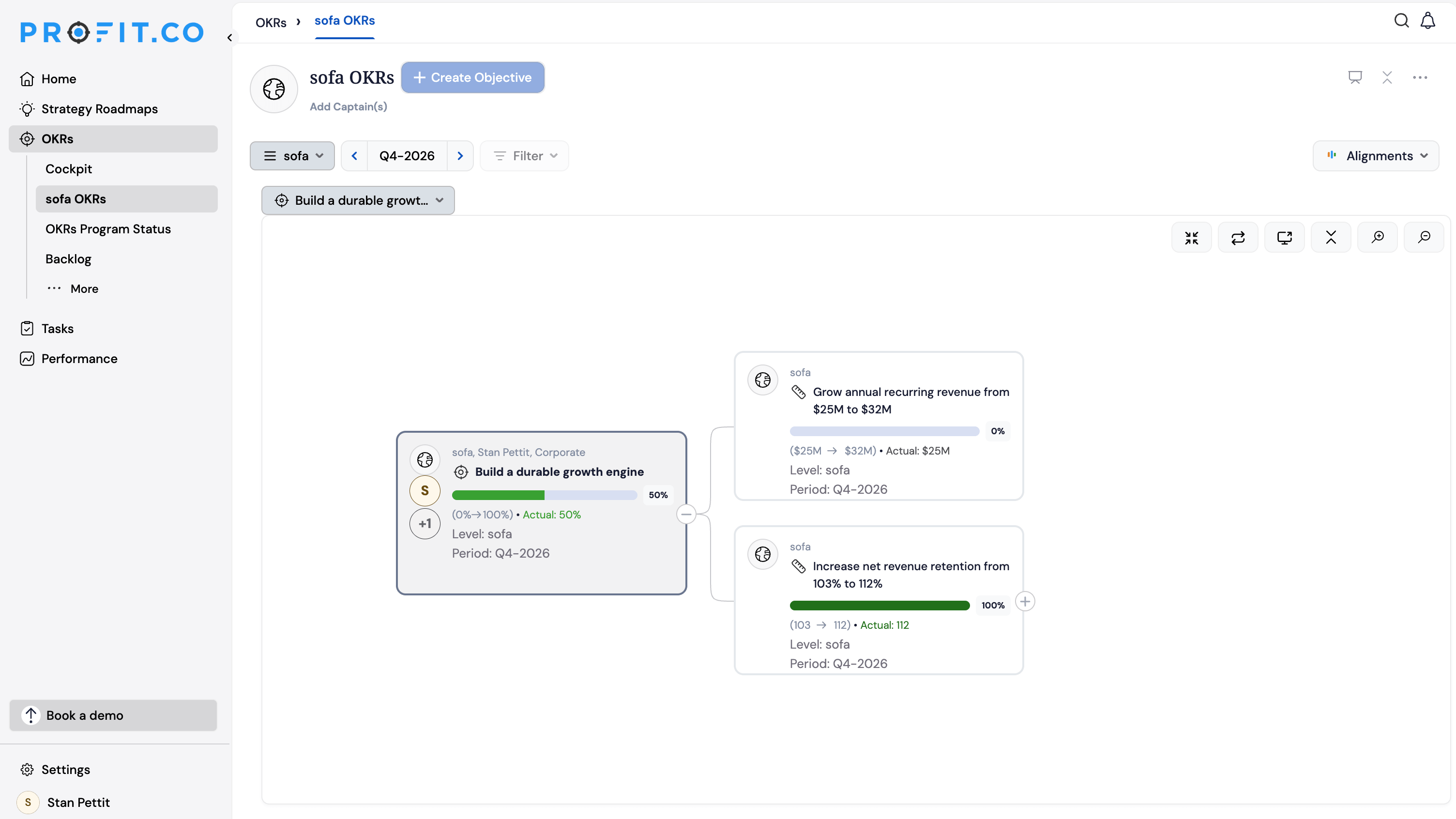
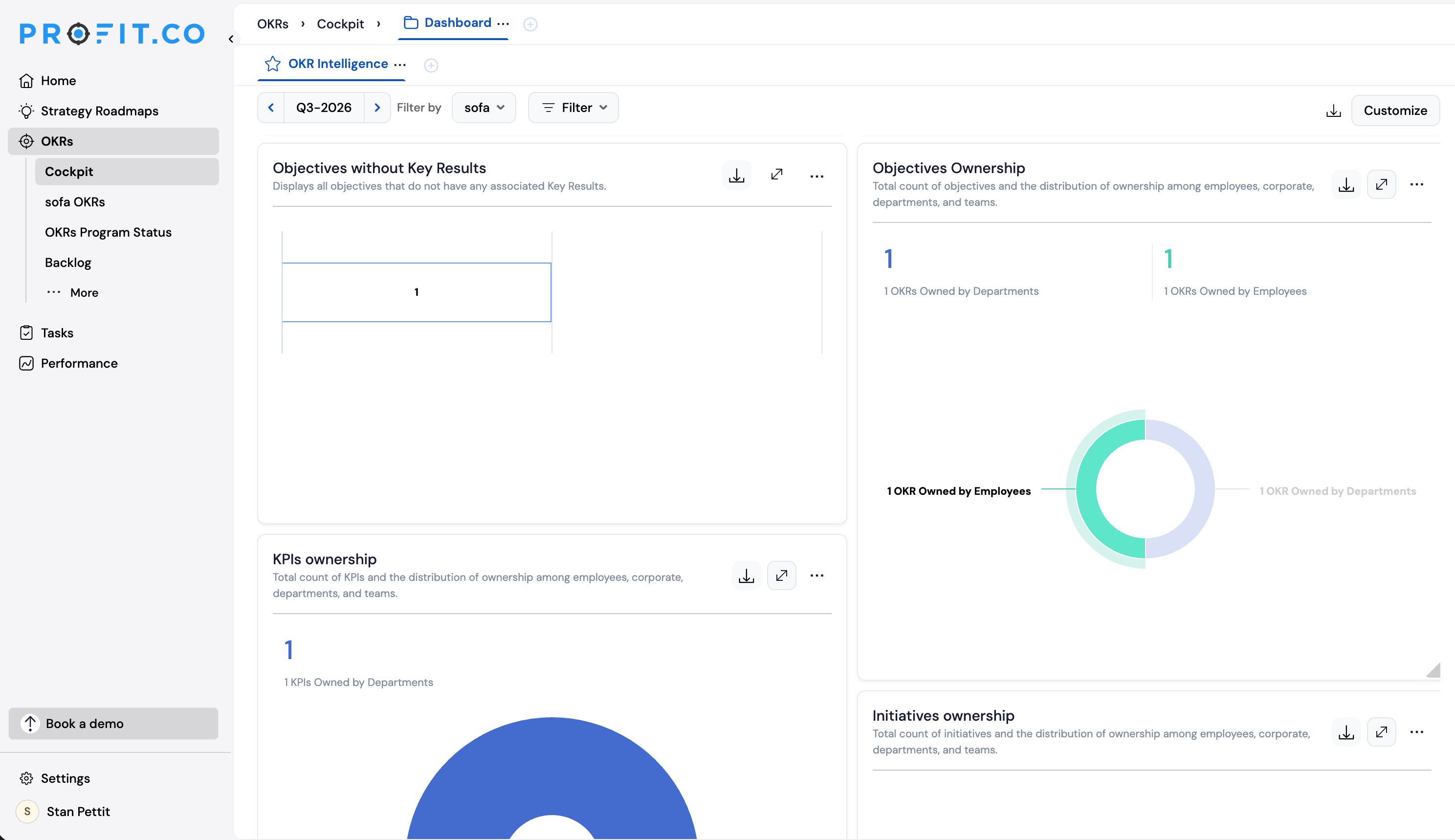
- The Cockpit's KPI board told me I had no OKRs defined with KPIs when I did.
- No cascading view and no per-person views. Profiles show a manager and a department, not goals.
- AI needs your own API key and was out of reach on my trial. Connecting a data source took real effort.
- The UI general feels heavy and a bit outdated in some parts
Core screenshots
Pricing
Not published. Formerly around $9/user/month, now custom quotes with a minimum annual spend around $10,000. 30-day trial.
Rhythms – 3.3/5
Full benchmark profile · rhythms.ai
Best for: teams that already work through Claude or ChatGPT all day.
Not for: anyone who wants a fast conventional interface first, or a price before the sales call.
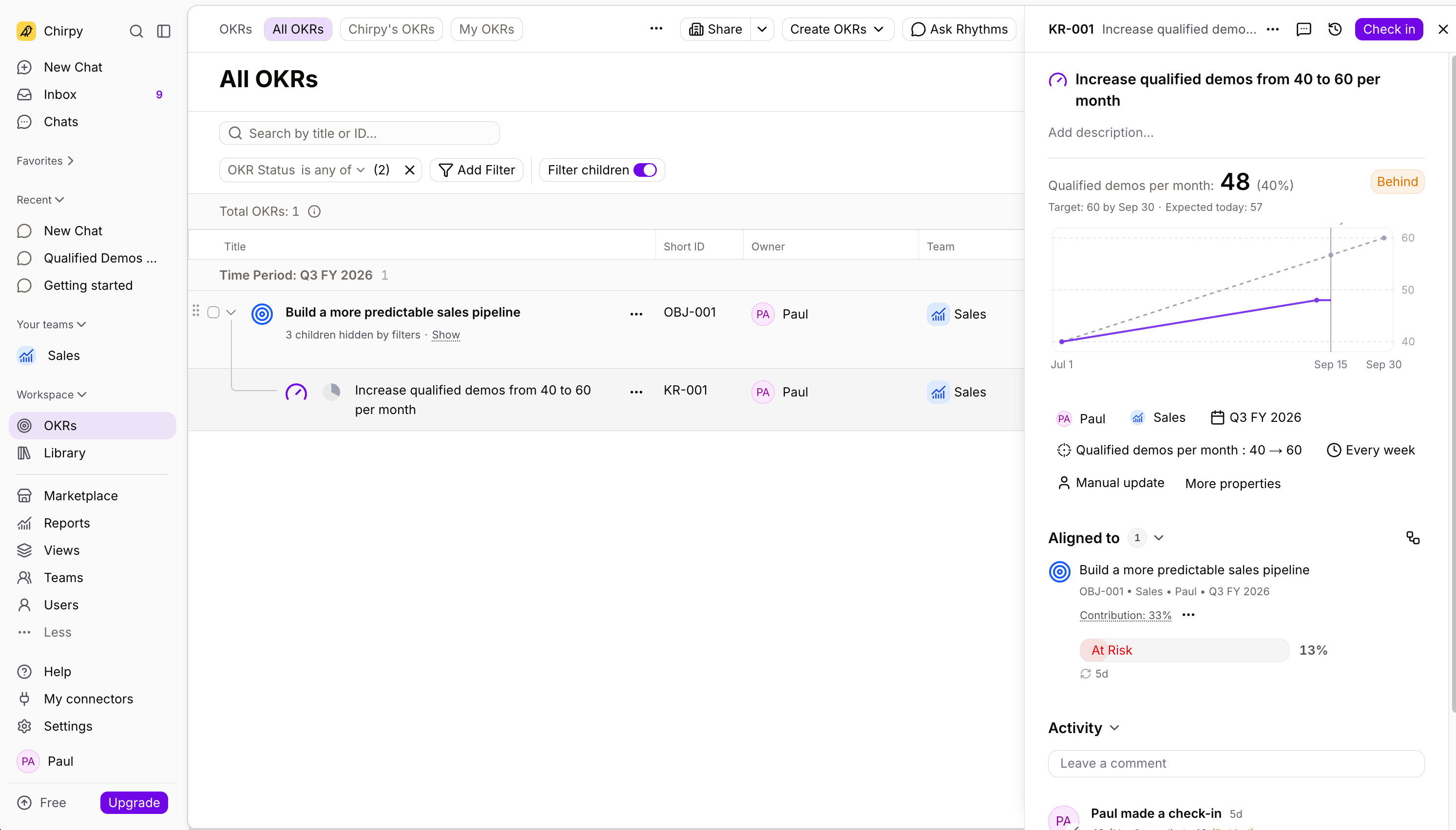
Overview: Rhythms is a new platform created by the team behind Ally.io (an OKR platform acquired and then sunsetted by Microsoft). Rhythms is taking a bit of a different approach. It isn't an OKR platform with AI, it's an AI platform that can do OKRs. This flip means that many actions are done by talking to an AI assistant rather than clicking through a product. This bet works in some cases (it built my plan from one pasted message), but it can also introduce some friction when you want to quickly set up a data connector or edit a specific KR. It also seems that what's not AI isn't getting as much love: a small key result panel, one report type, an app that has to always think before showing data.
Strengths
- Rhythms is betting hard on AI and you can do many actions through the internal AI mode.
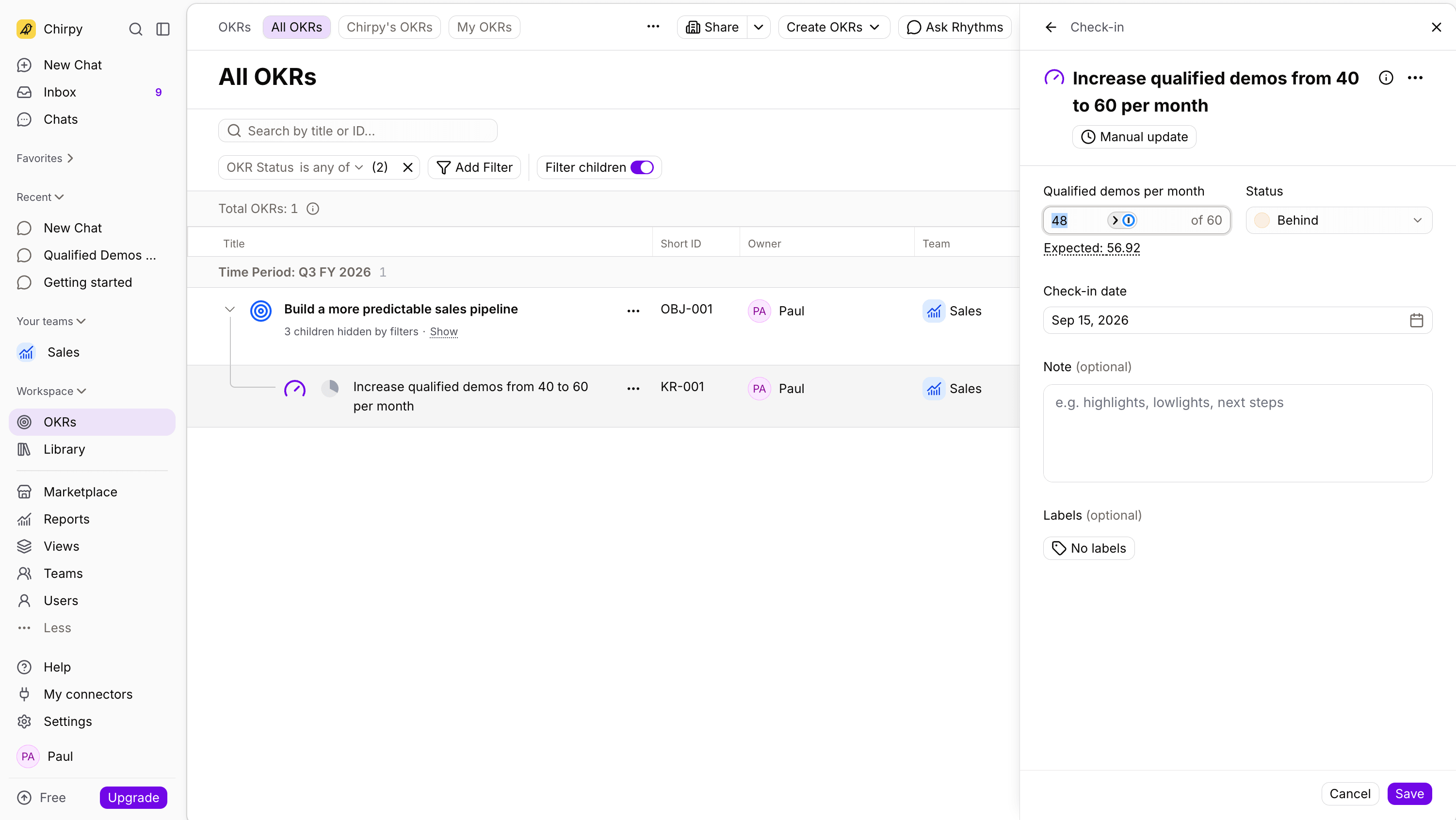
- The check-in quietly beats bigger names: a value, a status I chose myself, and the expected value for the date shown next to my actual.
- Cadence and reminders configure per team rather than per workspace.
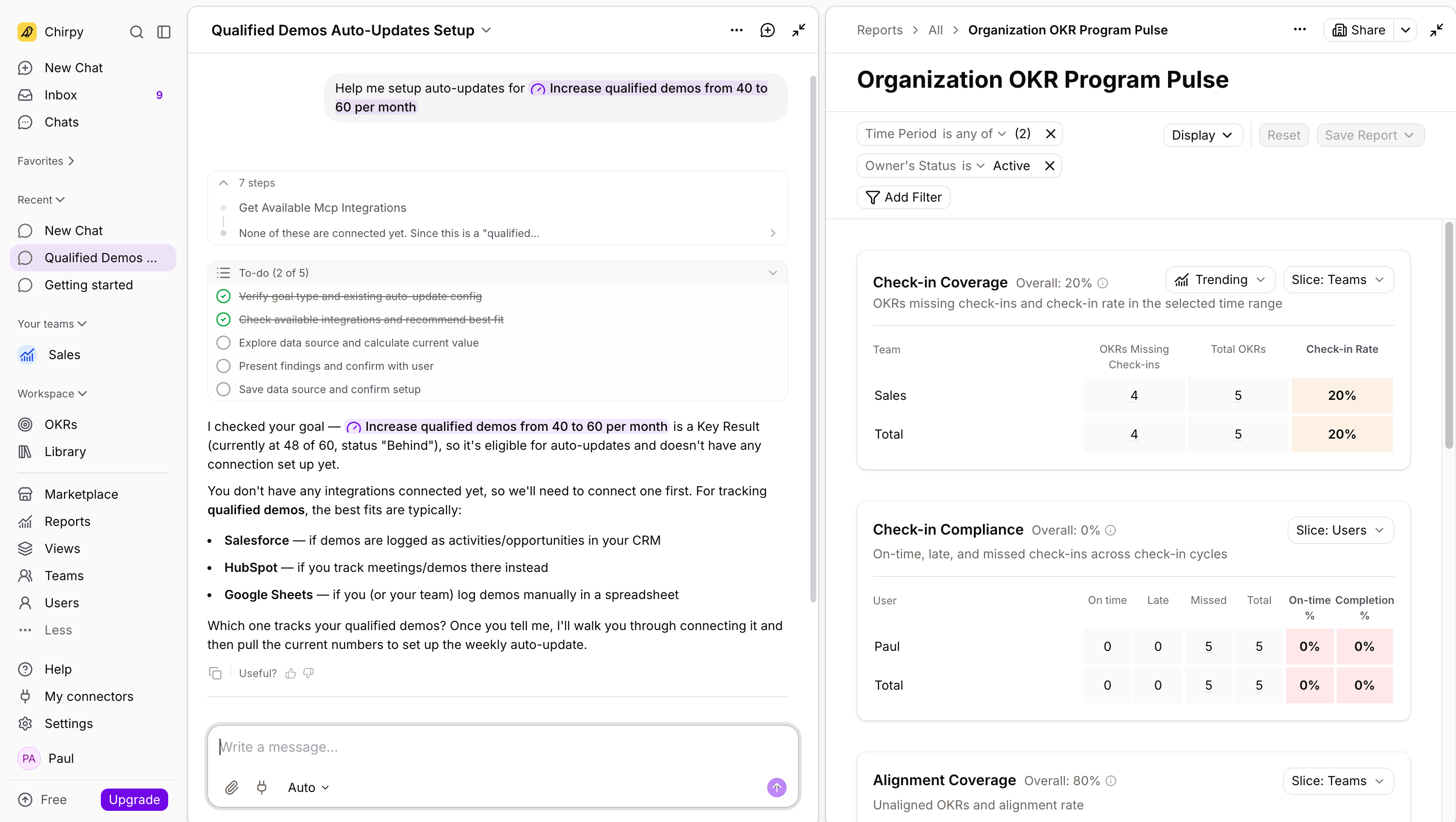
- Check-in Coverage and Compliance reports built for an OKR champion, clearer than the equivalents in Mooncamp or Profit.co.
- The largest connector catalogue in the test at 198 tools, with key results that auto-update from connected sources.
Where it falls short
- Rhythms takes an AI-first approach to the UI. This is great in some aspects, but can get in the way when you just want to set up a data connector or add a KR.
- UI is noticeably slow to respond even without a lot of data in it.
- One report type out of the box, then you build your own views.
- The key result panel is small and can't be enlarged.
- No per-person dashboards, no restrictions on who creates content, and chat-first navigation buries the current state of your OKRs. Slow at times.
- Pricing not transparent -- can be a costly solution to deploy
Core screenshots
Pricing
Not published. The site leads with a free-forever plan with limited AI credits. Estimates are anchored on the withdrawn $22/user/month list price. Enterprise custom with SSO, SCIM and audit logs.
Mooncamp – 3.3/5
Full benchmark profile · mooncamp.com
Best for: clean, manual OKR tracking your team will actually use.
Not for: anyone who needs AI, or ability to scale rapidly with importers and leadership-ready reporting.
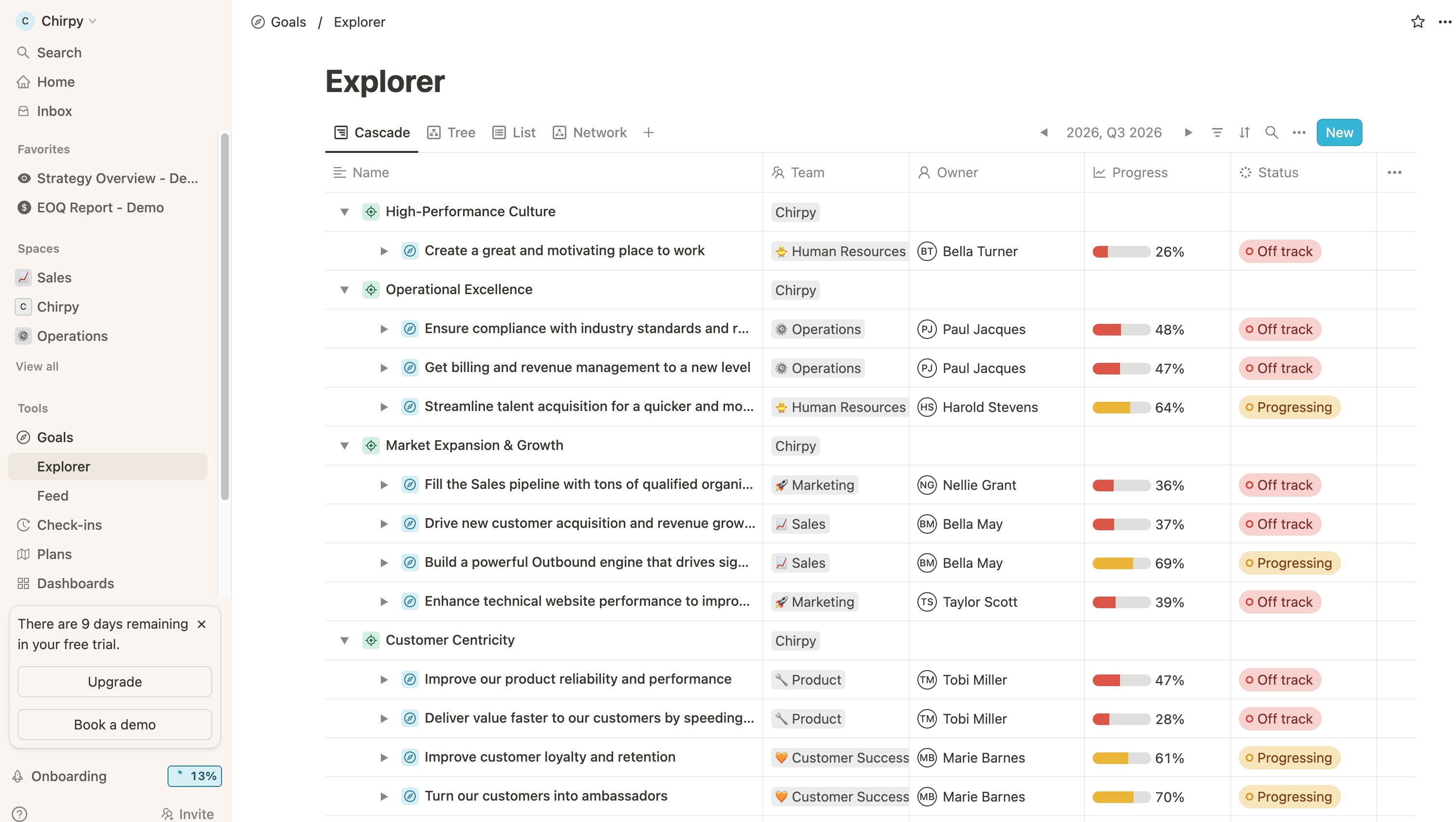
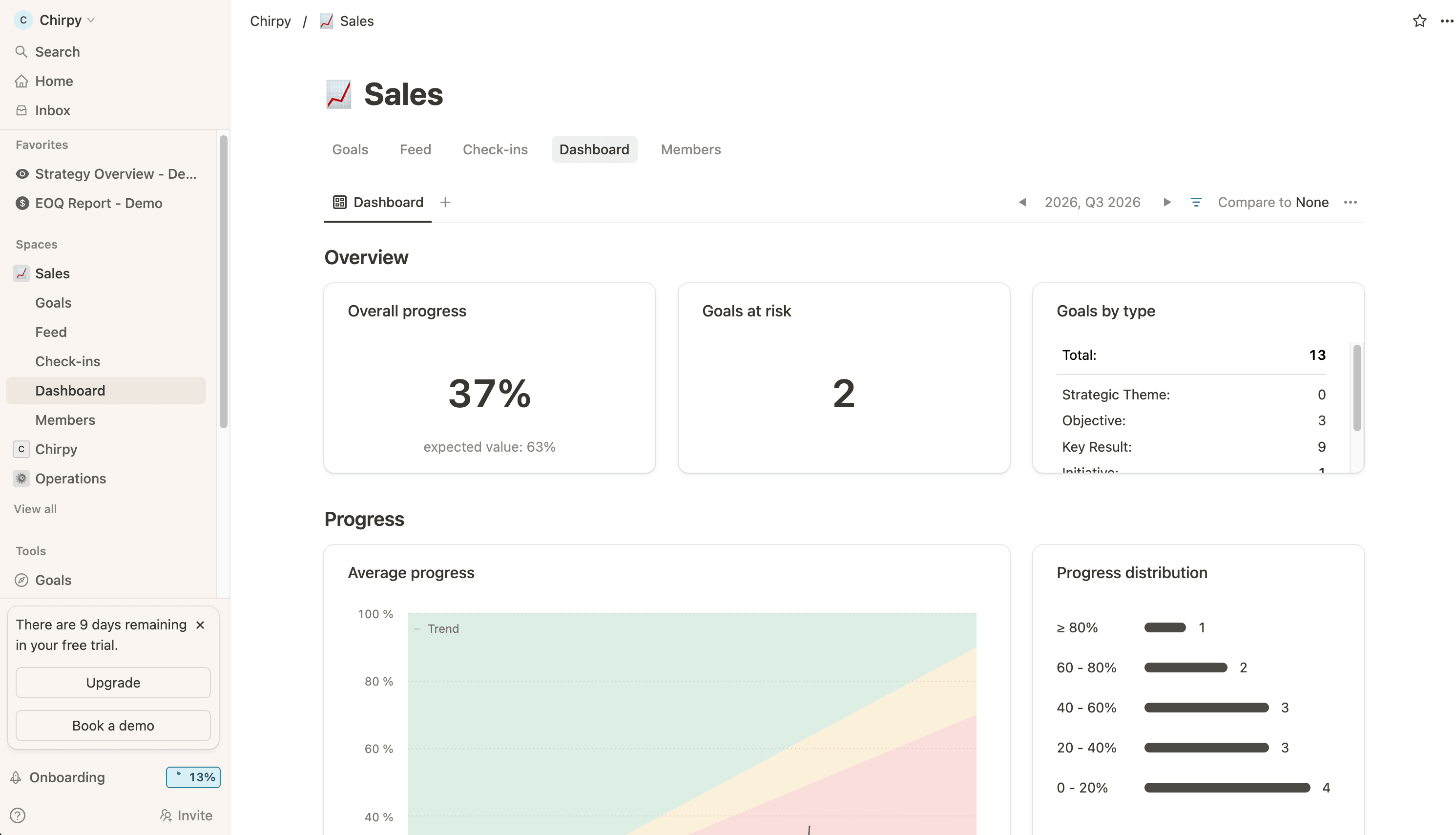
Overview: Mooncamp is an EU-based OKR platform designed to feel like Notion: flexible goal types, a clean editor, and as little process as possible, for teams that want their OKRs to look and feel like the rest of their tools. What stands out about Mooncamp is how easy it is to set up. I scored it 5 on ease of use. What I kept looking for and not finding was everything a rollout needs to scale after the first team is in: an importer, an API, AI of any kind, and reporting you don't have to build yourself.
Strengths
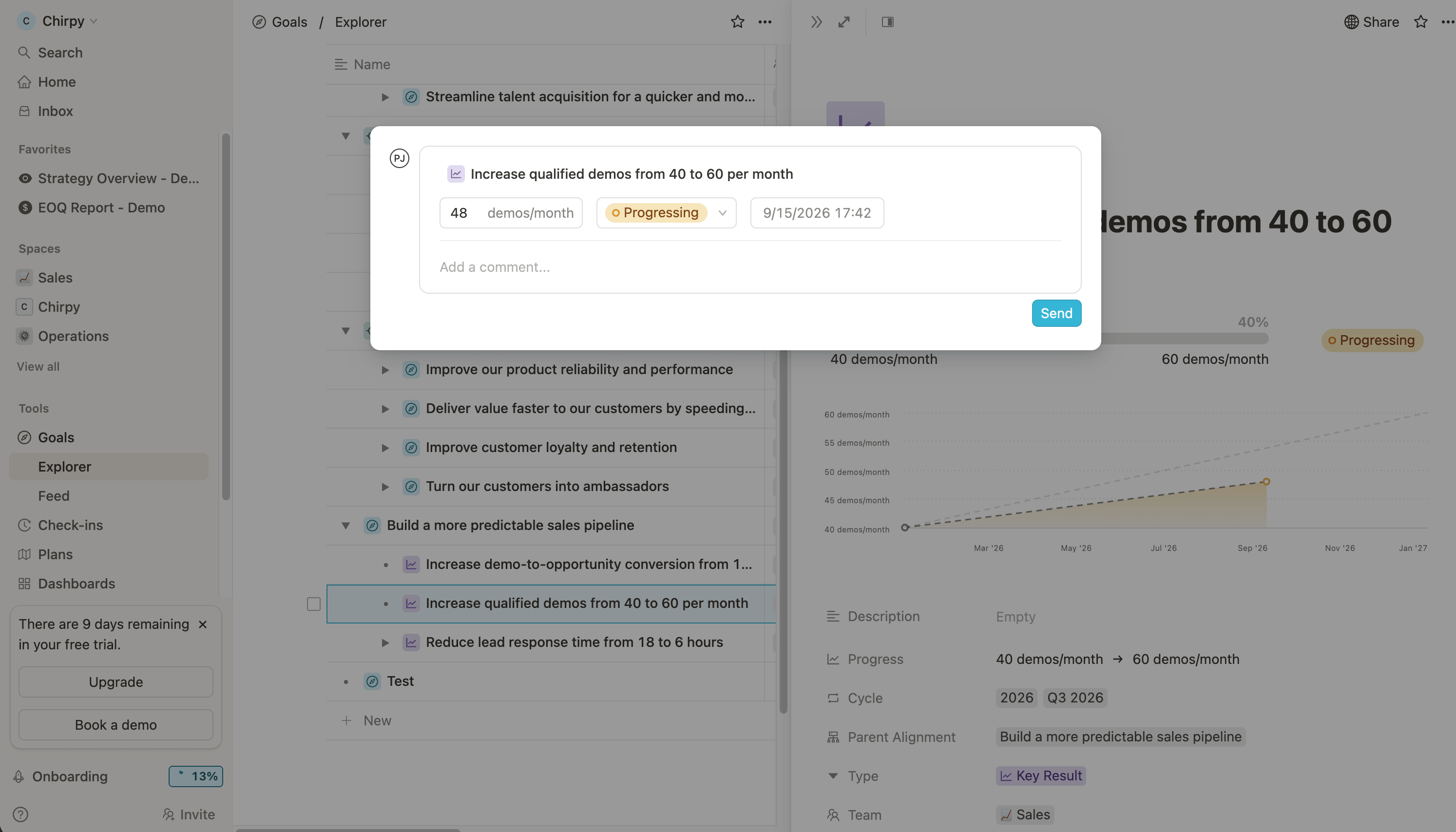
- Great core OKR workflow: proper start and target values with threshold options, weighted rollups from sub-items, multiple parent objectives, and a progress chart on every key result.
- Clean cascade view making it easy to scan the OKRs in a workspace
- Custom goal types let you name and shape your own hierarchy.
- EU-based, GDPR compliant, familiar if your team uses Notion.
Where it falls short
- Can feel like an extra spreadsheet. Feedback and conversations feel buried.
- No importer and no bulk administration, so every goal is a form. For a 40-team rollout that's the whole problem.
- No AI surface and no MCP found. No public API, no webhooks.
- Nine data connectors in-app, four gated to Pro, and Jira connects through an API token feed rather than a true sync.
- Dashboards are built by hand and there's no presentation mode.
- No people view.
- Access rules control who can see a goal, not who can create one, which I verified with a second user. SAML with SCIM sits behind the 100-plus-user Enterprise plan.
Core screenshots
Pricing
Essential €7, Professional €10 per user per month, annual only, minimum 5 seats and 100+ for enterprise. No free plan, 14-day trial.
Oboard – 3.1/5
Full benchmark profile · oboard.io
Best for: teams that live in Jira and want good check-in discussions at a very low price.
Not for: scaling across many teams, or anyone who needs SCIM.
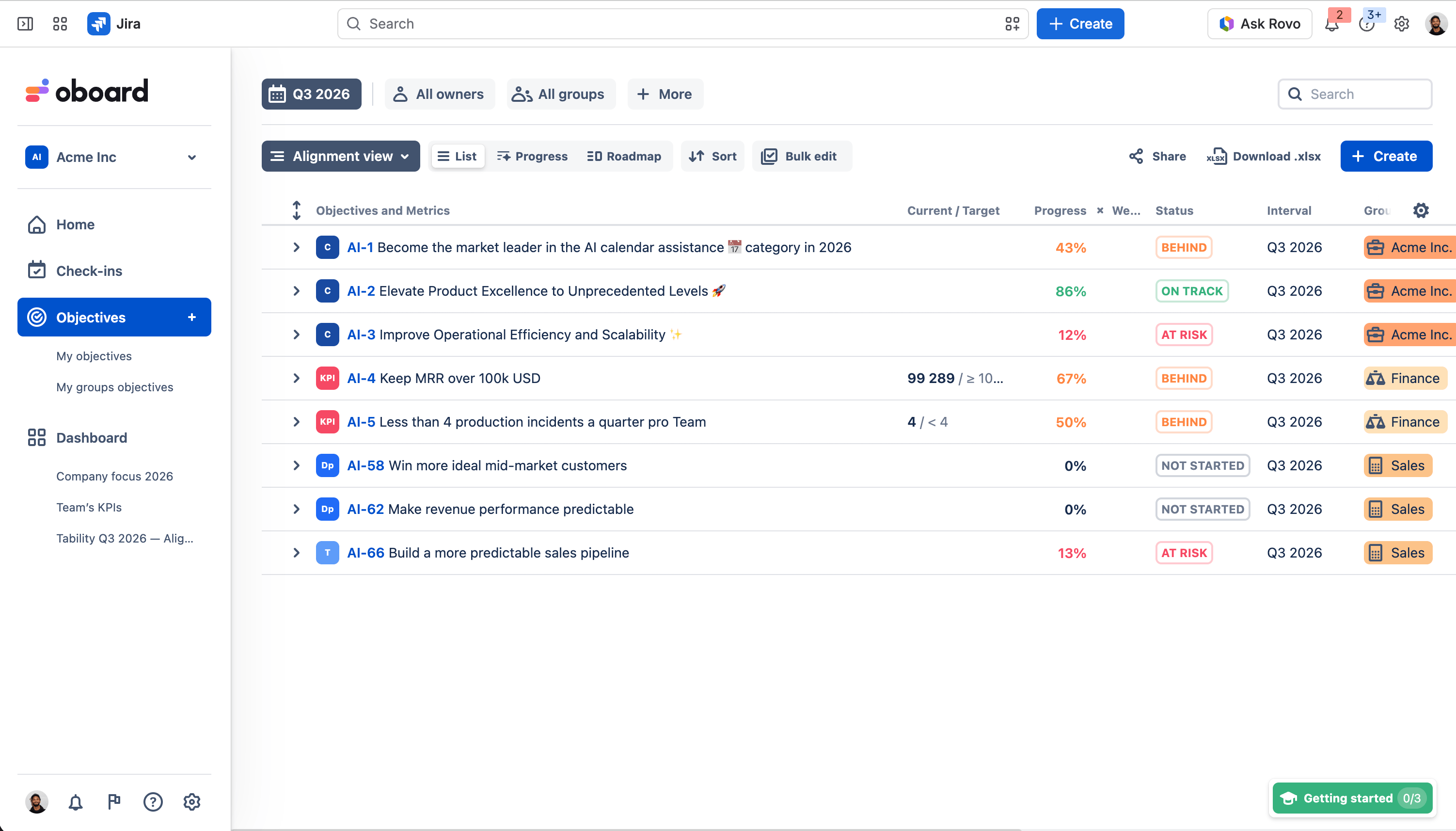
Overview: Oboard is an OKR app that lives inside Jira and is sold through the Atlassian Marketplace, for engineering organisations that won't adopt another tool and want their goals next to their tickets. What stands out about Oboard is the check-in: a status you control, comments built for discussion, reactions and replies, on the cheapest platform in this guide. The dashboards surprised me too. What limits it is the Jira boundary. No connectors beyond Jira, no SCIM of its own, units capped at five characters, and no way to see one person's goals.
Strengths
- Discussion is front and centre on the check-in, where plenty of pricier platforms bury it.
- Each key result has a progress graph and updates roll up to the objective.
- Reporting that surprised me for a tool this light: a default dashboard with cycle progress and status counts, a per-team performance report, and custom dashboards from text, KPI and OKR widgets.
- Bulk linking of Jira issues and epics to key results with JQL, with weighted progress calculation as work closes.
Where it falls short
- Units capped at five characters, so "demos per month" lives in the title.
- Teams attach like tags rather than structure, and the map reads as a cascade, not a team comparison.
- Identity comes through Jira rather than the app's own SAML, and there's no SCIM.
- No data connectors for key results beyond Jira, so manual updates everywhere.
- Visibility controls but no who-can-create or who-can-edit.
- No per-person views. No AI appeared in the edition I tested.
Pricing
Billed per Jira instance via the Atlassian Marketplace. Free for 10 or fewer users, then $2.16/user/month up to 100, declining with volume.
Teamflect – 3.1/5
Full benchmark profile · teamflect.com
Best for: Microsoft-heavy organisations that want performance management with light OKRs.
Not for: OKRs that scale, or anyone who needs SCIM.
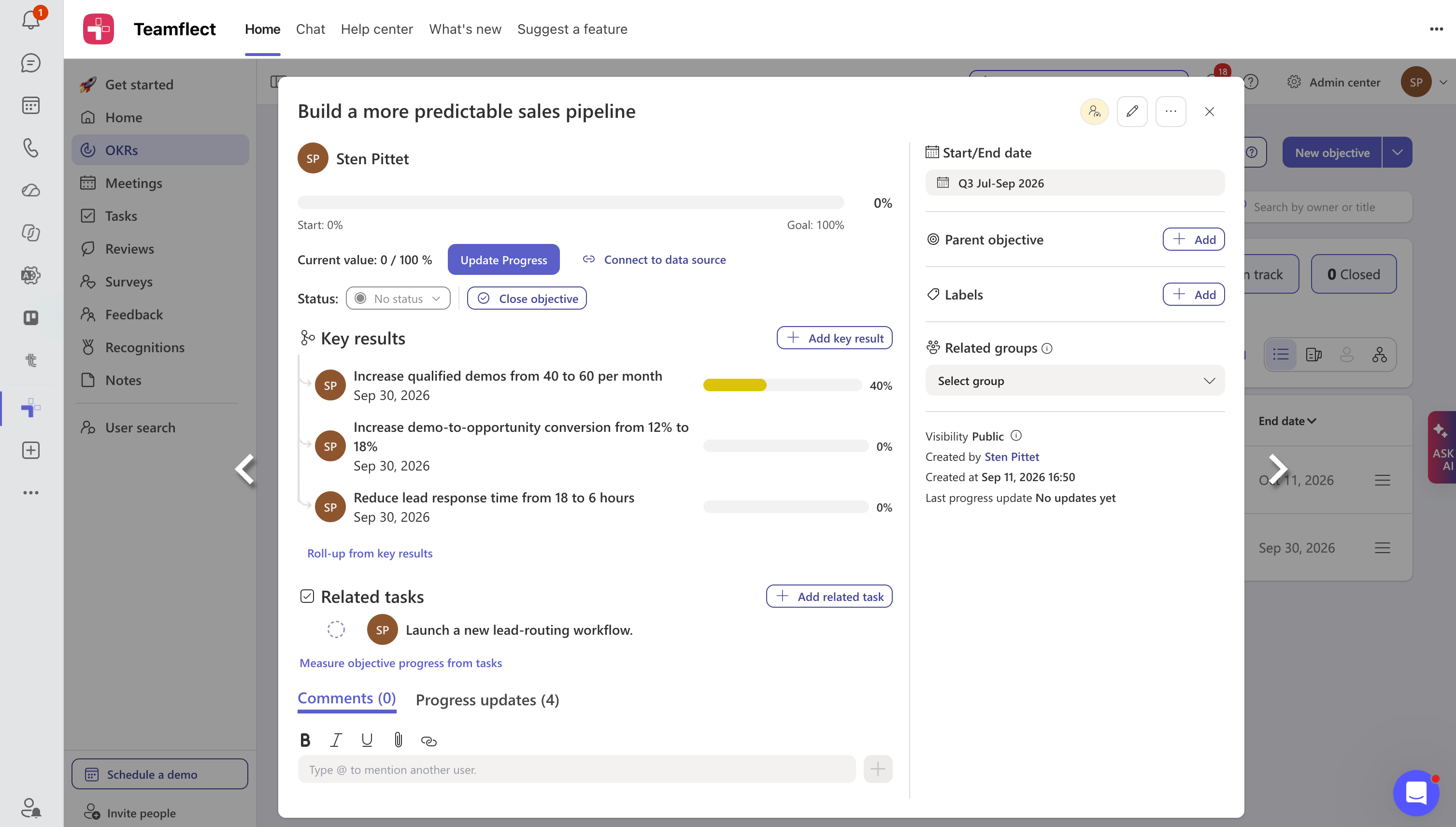
Overview: Teamflect is a performance management platform for Microsoft 365 that includes OKRs alongside reviews, meetings, tasks and recognition, for HR-led organisations that live in Teams and want one app for all of it. What stands out about Teamflect is the free tier, ten users with everything, and the conversation you can have on a key result, which bigger products can't match. What it isn't is an OKR tool first. The model is loose, metrics stop at three types, there are no progress charts, and its AI couldn't find the goal I'd just created.
Strengths
- You can reply and hold a real conversation on a key result, with mentions, which several bigger platforms lack.
- The check-in itself was easy: value, status set myself, comment posted.
- Meetings, tasks and performance reviews are proper parts of the product. My lead-routing initiative went straight into the native tasks module.
- The most generous free tier in the test.
Where it falls short
- The OKR model is loose. Objectives can carry their own metric, and the key result form is titled "Objective title".
- Metric types stop at percentage, number and currency, so my hours-based key result became a bare number.
- No progress charts anywhere, only bars, so trends are invisible.
- Basic cascading view, no way to see teams side by side.
- Sign-in via Microsoft 365 rather than the app's own SAML, no SCIM. Data connectors stop at Excel, Planner, Power BI and Power Automate.
- No per-person views, no self-set check-in reminders. Ask AI failed the grounding test and I found no MCP server.
Pricing. Free for up to 10 users with full functionality, the most generous free tier in the benchmark. Essential $7/user/month annual, Professional $11. The AI Agent is limited on Essential and unlimited on Professional.
Cascade – 3.1/5
Full benchmark profile · cascade.app
Best for: a numbers-driven strategy office reporting to executives quarterly.
Not for: an OKR practice that runs on team judgement and conversation.
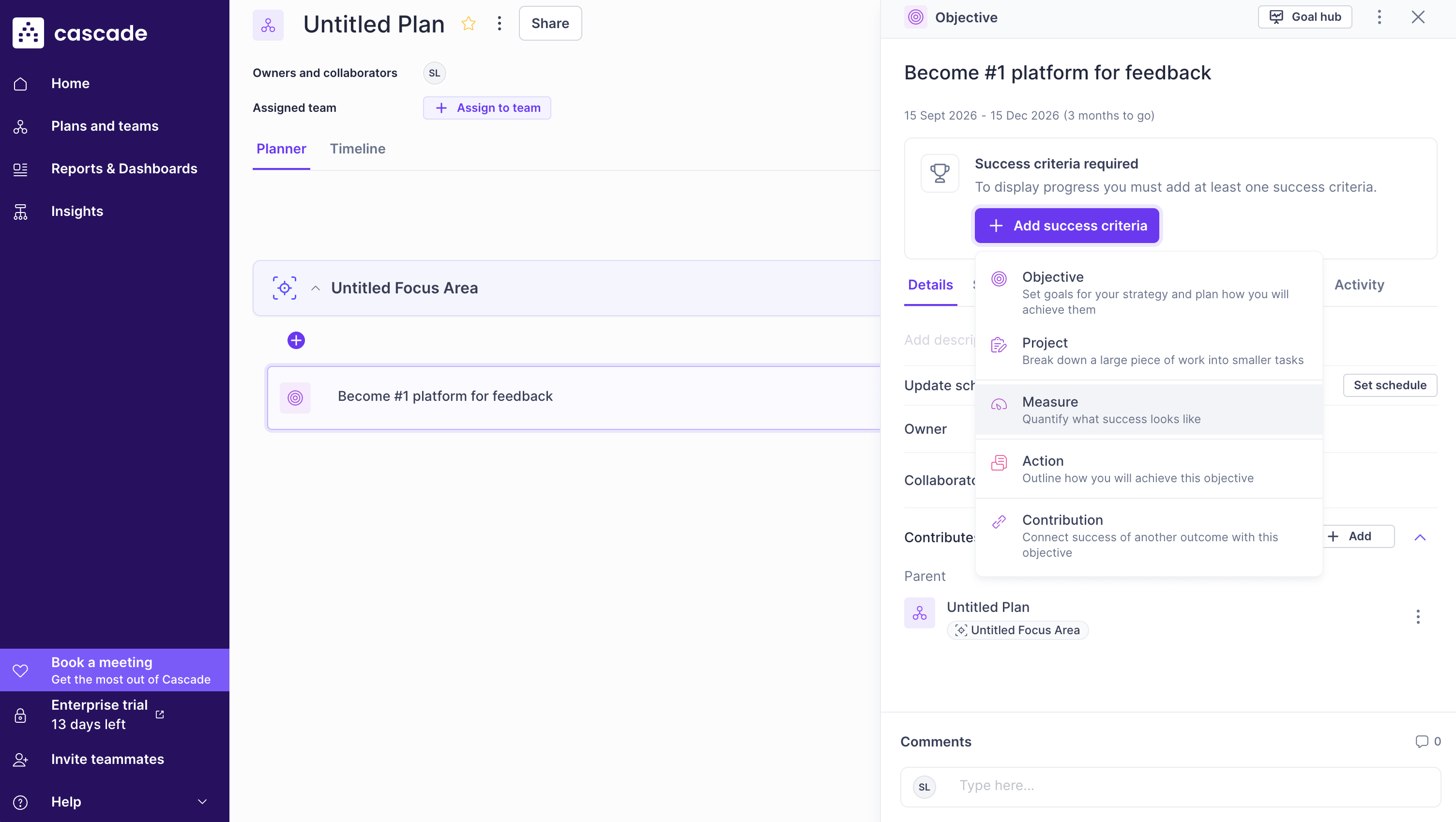
Overview: Cascade is a strategy execution platform for leadership teams that plan top-down: focus areas, objectives, measures and projects, reported quarterly. It's aimed at the strategy office more than the team doing the work. What stands out about Cascade is the reporting. It generated an executive quarterly review with an AI-written analysis I'd have been happy to send to a board. What worked against it is everything before that moment: a setup that fights the OKR model, a confidence score you can't override, and check-ins you can't reply to or find again.
Strengths
- The best single thing I saw in twelve sessions: I asked for an executive quarterly review and Cascade generated it, with an AI-written overview that flagged the two stalled measures, quantified the gap and suggested a conversation with the owner, with a presentation view on top.
- Strong top-down strategy workflows and visibility across goals, KPIs and initiatives.
- A metric tree where metrics feed each other by calculation, manually, or from an integration.
- The update form gives comments real space with attachments.
Where it falls short
- Confidence is computed against the expected line with no owner override. The failure mode is the hot start that goes flat and stays green.
- Check-ins are hard to find again, there's no way to comment on one, and I couldn't work out how to edit a target.
- No standing dashboards and no quick filter for what's red, so ongoing tracking is much weaker than quarter-end reporting.
- The trial exposed three connectors against a mature catalogue on the website. I read that as a trial limit, but test it.
- No MCP found. Slow throughout.
Pricing. Free for 2 users. Paid tiers are contact-sales. Third-party estimates put it at $19-29/user/month by volume.
OKRs Tool – 3.0/5
Full benchmark profile · okrstool.com
Best for: a small team on a tight budget that can live with rough edges.
Not for: a rollout, or anyone who needs automatic updates and AI that reads goals correctly.
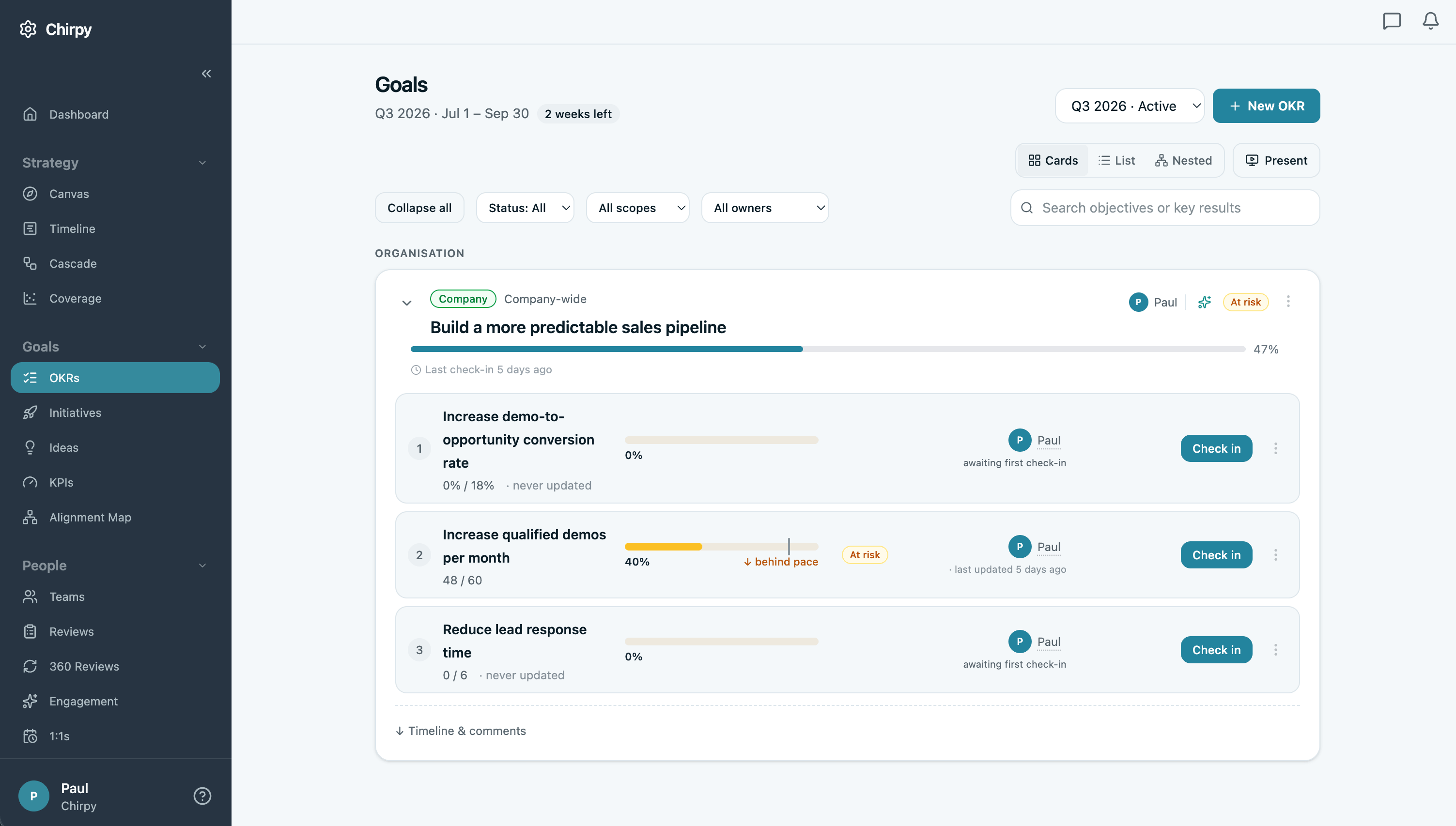
Overview: OKRs Tool is a low-cost OKR platform on a flat monthly fee rather than a per-seat price, for small teams that want a lot of features for very little money. What stands out about OKRs Tool is ambition: an AI drafter, a free MCP server, an initiatives board and more pre-made reports than anything I tested. What it needs is another year. The import set every baseline to zero, my corrections wouldn't display, reports spun without loading, and the AI Coach didn't know my objective had key results.
Strengths
- Great for teams on a budget.
- More pre-made reporting than anything I tested: trends, insights, a risk view, auto-generated monthly and quarterly reviews, a momentum map, an initiatives board, an in-app present mode.
Where it falls short
- Import set every baseline to zero and the interface kept showing old values after I corrected them.
- The AI Coach seems flakey: it built its recommendation on the claim that my objective had no key results (it had some).
- Slow, and several reports never loaded.
- No per-key-result page or trend chart. Metric formats stop at number, percentage and yes/no.
- No data connectors.
- Pricing bands stop at 51+ with no enterprise contract. Seven G2 reviews.
Pricing
$49 a month flat up to 50 users, $129 unlimited above that. Free for 1-5 users. First in the benchmark's affordable category.
Weekdone – 2.5/5
Full benchmark profile · weekdone.com
Best for: three or fewer people learning OKRs on the free tier.
Not for: anyone who wants owner-set confidence, trend charts, AI or connectors.
Overview
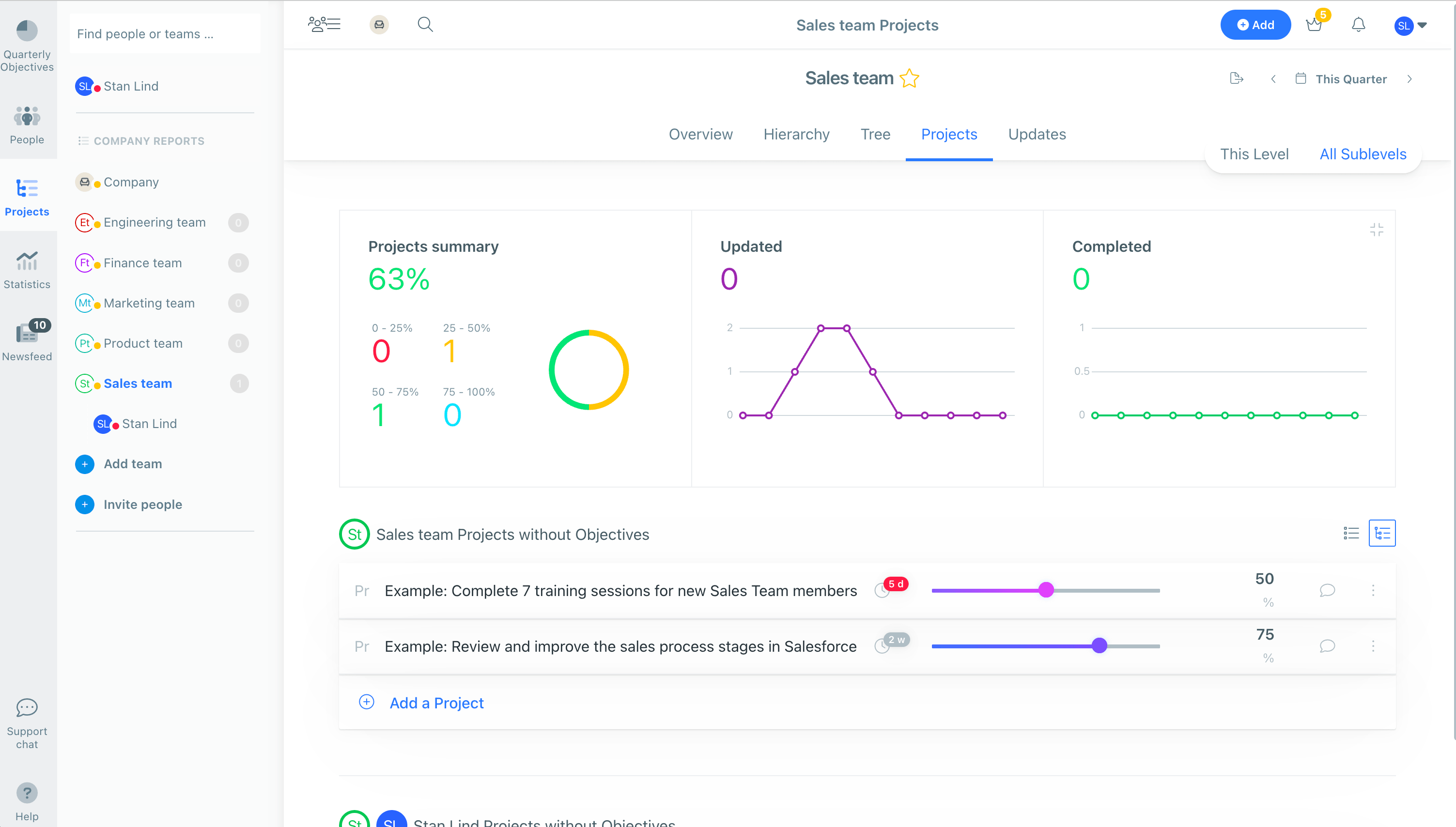
Weekdone is one of the older OKR tools on the market, combining quarterly OKRs with weekly plans and KPIs, for small teams that want structure without much configuration. What stands out about Weekdone is the Tree view, and a restriction on who can create OKRs that only Tability also offers. What dates it is the check-in: no chart for a key result, comments detached from the value you logged, and a confidence score the product picks for you.
Strengths
- The Tree view is the clearest read of the structure.
- One of only two platforms here that let an admin restrict who creates OKRs, the other being Tability.
- KPIs alongside OKRs and a working presentation mode.
- A per-person view.
Where it falls short
- Statuses are auto-assigned from progress with no override. You cannot say "we're at 48 but I'm worried." That alone would stop me recommending it for check-ins.
- Comments aren't attached to the value you logged.
- Basic bar-chart reporting, well behind the field. No AI.
- Integrations stop at Slack, Teams and task links. No data connectors. No SCIM.
- The team page buries OKRs under personal OKRs, personal KPIs and projects in one busy screen.
Pricing
Free for 3 users, volume pricing from about $9/user/month, unconfirmed because the vendor's pricing page was erroring when re-checked.
Atlassian Goals – 2.4/5
Full benchmark profile · atlassian.com
Best for: free, lightweight goal visibility inside Atlassian with Rovo on top.
Not for: anyone serious about OKRs.
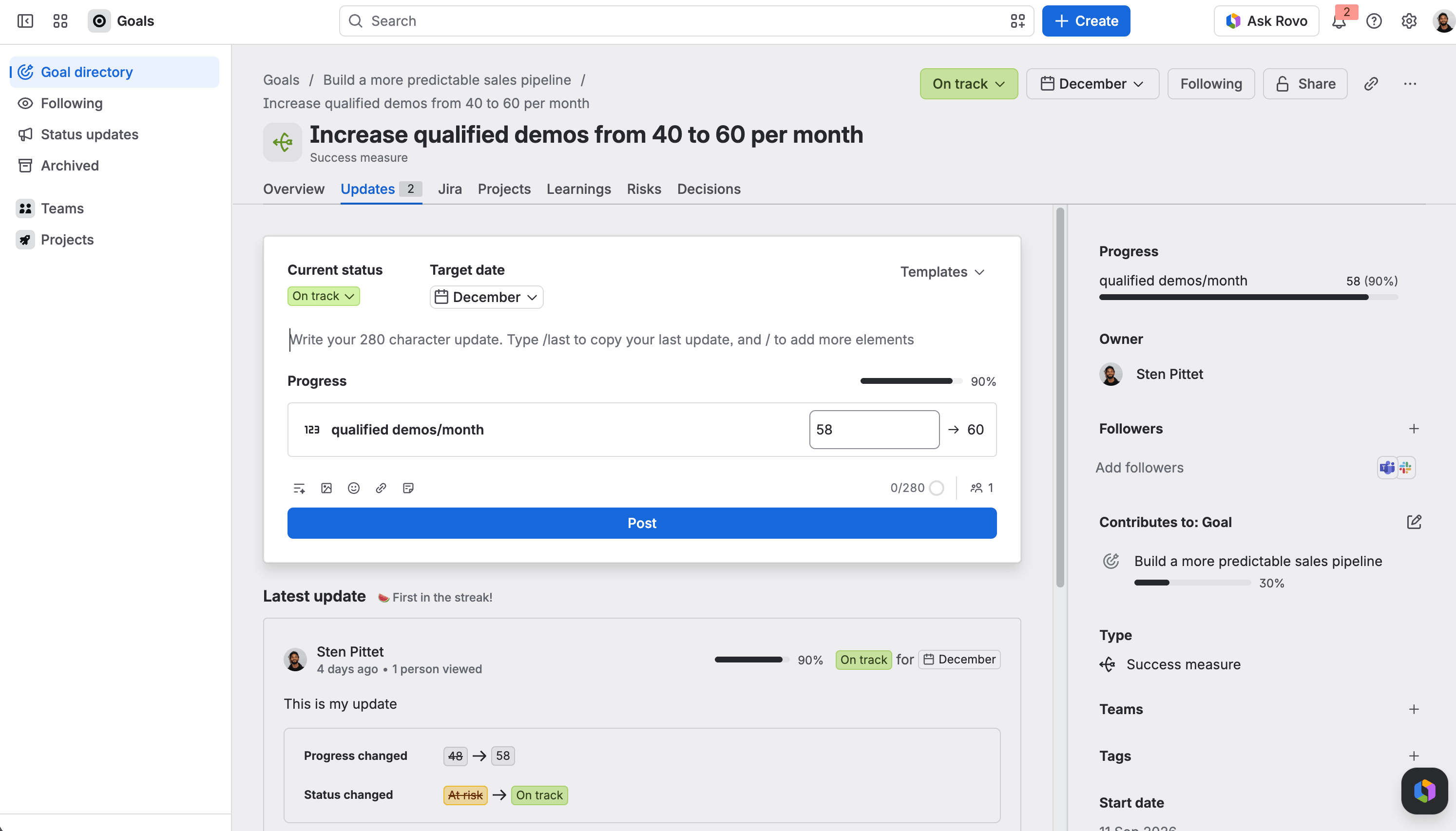
Overview: Atlassian Goals is the goal-tracking feature included with Atlassian cloud plans, connecting objectives to Jira work and Confluence pages, for teams already in Atlassian who want lightweight visibility without buying anything. What stands out about Atlassian Goals is Rovo, which found and summarised the goal I'd just created when paid products couldn't, and the discussion thread under each update. What holds it back is that it's oddly manual for something inside Jira: a separate form for every measure, tickets you paste in by URL, and no reporting beyond cards.
Strengths
- Free is a real argument.
- Rovo passed the grounding test where paid products failed, finding my goal with owner, status and dates correct.
- A Rovo MCP server exists for the setup-tolerant.
- Updates carry a real discussion thread, because Jira's commenting is good.
- Identity comes through Atlassian, so SSO and SCIM are whatever you already run.
Where it falls short
- No cascading or strategy maps, no generated reports, and success measures shown as thin cards that read poorly for a manager.
- Metrics are separate objects with their own target dates.
- You can't create a ticket from a goal, which is the OKR-to-initiative flow run backwards.
- No data connectors and no reminder settings I could find.
- Enough setup to feel like work, without the richness to justify it.
Pricing. Included with every Atlassian cloud plan. More capabilities in the paid Strategy Collection.
Range – 2.1/5
Full benchmark profile · range.co
Best for: weekly team rituals: async check-ins, meetings, mood and kudos.
Not for: OKRs.
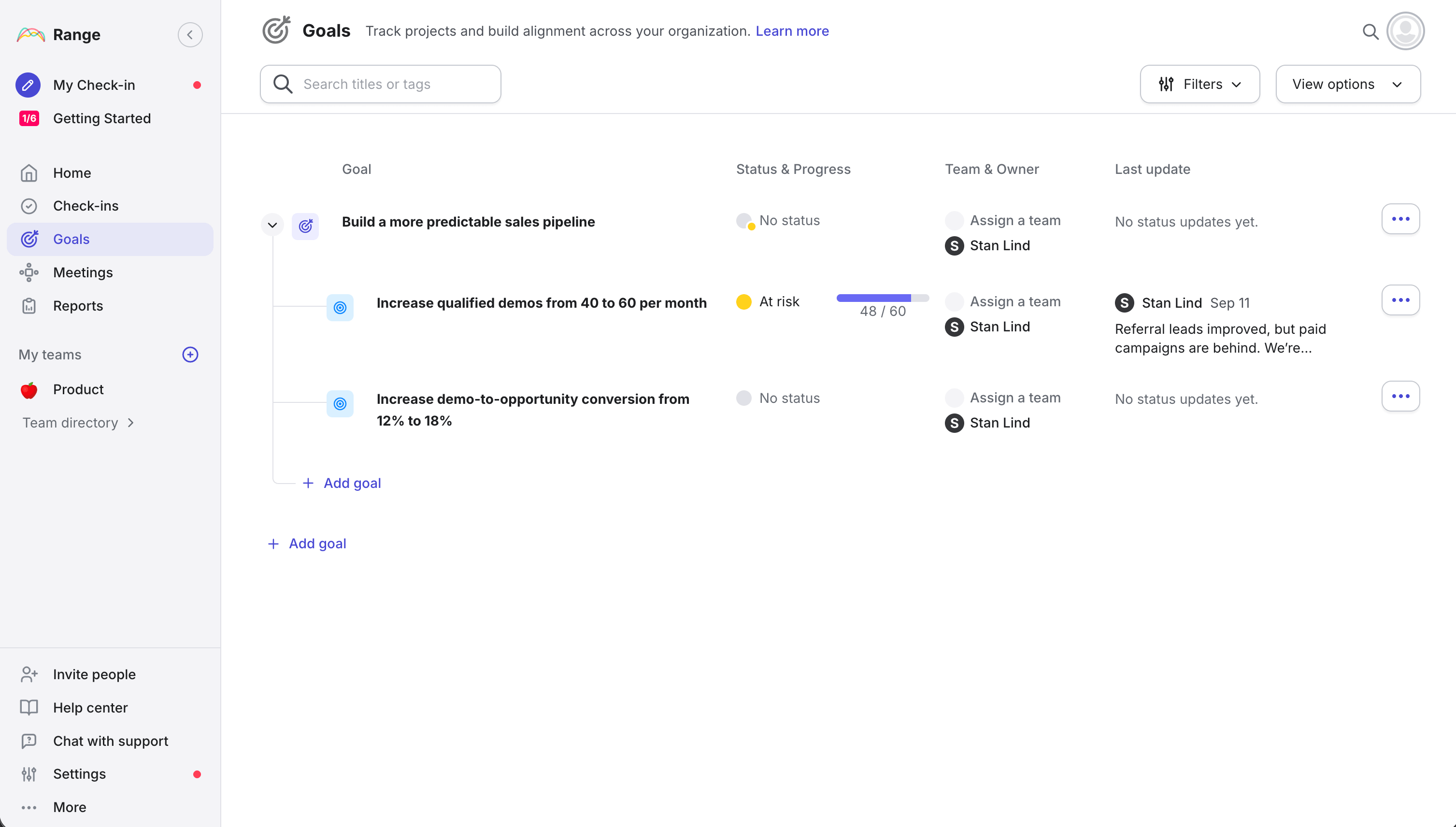
Overview. Range is an async team tool for daily check-ins, meetings and team health, with goals attached. It's built for distributed teams that want a weekly rhythm, not for OKRs. What stands out about Range is the design, up there with the best I tested. What rules it out here is the goal model: no key results, a metric that only appears when you post an update, and every metric starting at zero.
Strengths
- An interface up there with the best-designed tools I tested.
- 75+ integrations that attach work items to check-ins.
- The most generous free tier in the field at 12 users.
Where it falls short
- No key results and no metric at creation.
- No baseline on any metric.
- No progress chart, no commenting on updates once shared.
Pricing. Free for 12 users, then $8/user/month.
Workboard: the one I couldn't test
Documentation-based benchmark profile · workboard.com
Best for: very large, services-led rollouts with a change-management partner attached.
Not for: anyone who wants a trial before a sales call, teams wanted a rapid rollout without having to pay extra for onboarding services
Overview. Workboard is an enterprise strategy execution platform sold through demos and services, for large organisations running business reviews at scale. It absorbed Quantive in 2025. What stands out on paper is the business review tooling and AI briefings. What I can't tell you is how it feels to use, because there's no trial, and I'm not scoring what I didn't test.
Strengths
- A mature strategy execution platform with strong business review tooling and AI briefings.
- The Quantive customer base and connector library absorbed in 2025.
Where it falls short
- Most expensive solution to deploy
- Untested here. Two questions for the demo: show me the check-in module, because the consistent feedback is that there isn't a real one, and can I query my Workboard data from Claude or ChatGPT.
Pricing
Quote-only. From buyers I've spoken to, deployed cost with services runs well above the list prices in this guide. At 2,000 users it's a seven-figure decision.
Which OKR software to pick
The benchmark scores separately, weighting identity, governance and integration depth.
Of the twelve tested, eight qualify: Tability 4.4, Profit.co 4.3, Perdoo 4.1, Rhythms 3.7, Mooncamp 3.6, Teamflect 3.5, Oboard 3.1, Weekdone 2.6.
Workboard and Lattice also sit in the category on documentation-based scores, with Workboard the services-led runner-up. OKRs Tool's bands stop at 51+ with no enterprise contract. Atlassian Goals has the identity plumbing and falls short everywhere else. Profit.co moving from third overall to second for enterprise is the shift worth reading: the things that make it slow to set up are the things that make it governable.
By use case, from the benchmark's category rankings:
- Startups: Tability first, Mooncamp second, OKRs Tool third.
- Free: Teamflect, 10 users with full functionality. Oboard free for Jira instances of 10 or fewer. Perdoo and OKRs Tool to 5, Weekdone to 3, Range to 12. Every free plan caps at 12 or fewer.
- Cheapest at scale: OKRs Tool, $129 a month above 50 users. Oboard at $2.16 a user for Jira instances.
- Easiest to use: Tability first (4.8), Mooncamp second (4.5). Both score 5 on the underlying ease criterion.
- AI: Tability scores 5, Rhythms 4. Perdoo and Profit.co match Tability on MCP if querying goals from Claude or ChatGPT is the specific need.
- Jira shops: Oboard to stay inside Jira, Atlassian Goals if free matters more than depth, Tability or Mooncamp for a full platform where closing issues moves a key result.
- Microsoft Teams: Teamflect if performance management is in the brief. Tability if it isn't.
- Salesforce: Profit.co first, Tability second, Perdoo third.
Comparing capabilities
Scores by criterion
Six platforms have a documented MCP server, six can update a key result from a data source, three have webhooks, three make you build a metric object before a key result, two decide your confidence for you, two let an admin restrict who creates OKRs, and on three I never found the reminder setting.
On integrations, the six the benchmark documents in depth (Slack, Teams, Jira, Linear, Asana, Google Sheets) are listed on most of the field. Oboard, Atlassian Goals and Teamflect only document their host ecosystem. Linear is documented on Tability, OKRs Tool and Rhythms only among the platforms tested here. The question that matters on Jira is whether closing issues moves a key result, and the documentation establishes that for Tability (JQL issue counts as a data source, refreshed daily or weekly), Mooncamp (issue mapping with automatic progress calculation) and Oboard (bulk JQL linking with weighted progress). On Slack, submitting a check-in without leaving Slack is documented for Tability, Mooncamp, Perdoo, Profit.co and Weekdone.
AI readiness, scored
Six criteria on a 0-5 scale. A dash means the criterion wasn't assessed, which is different from a zero. No platform reaches a 5 on any criterion yet.
Perdoo and Profit.co tie Tability on MCP interoperability. Rhythms, the most AI-forward product by positioning, scores 2 there because its vendor-hosted server is unverified. The last column is where "agents can own outcomes" gets tested against every competitor, and where most of the field is a zero or a dash. Tability's score there is for an open beta.
One test to run on every vendor during a trial: create an objective with three key results, then ask the platform's own AI to summarise it. Across the twelve, four passed a grounded AI task. Atlassian's Rovo found the goal with the right owner, status and dates. Cascade's generated review matched the live plan data with nothing invented. Teamflect's Ask AI produced a summary beginning "it likely focuses on…" and then admitted it couldn't find the goal. OKRs Tool's coach told me the objective had no key results. It had three. On most of the rest, trial limits blocked the test. Ninety seconds, and it separates AI marketing from AI that's wired to your data.
Five things a spec sheet won't tell you
Each of these came out of the sessions rather than the docs. The vendor profiles above carry the evidence. This is the argument.
1. Building metrics as separate objects is a rollout tax
Profit.co, Cascade and Atlassian Goals make you create a KPI or metric object before the key result that uses it. Once, that's a form. Across forty teams and four key results each, it's 160 objects by hand before anyone has checked in, and it's a large part of why rollouts stall in week two. A KPI module isn't the problem, Tability has one for ongoing metrics like churn. Making it mandatory is. The same tax shows up in reminders: on Atlassian Goals, OKRs Tool and Teamflect I never found the setting, and Weekdone has one global switch.
Test it: time yourself creating three key results with different units. Over five minutes, multiply by your team count.
2. Is it a platform for conversations, or for listing numbers?
Every platform lets you leave a comment. Almost none treat it as the point. Cascade greys the comment out in history with no way to reply, Perdoo, Mooncamp and Profit.co put the chart first, and Weekdone detaches the comment from the value. Oboard, Teamflect and Atlassian Goals showed me a real thread in the session, and Tability documents one. The extreme case decides your confidence for you: Cascade and Weekdone assign status from the expected line with no override, so a hot start that goes flat stays green until week ten. Let the platform suggest a colour. Let the human set it. OKRs die as a reporting exercise and survive as a conversation.
Test it: post a check-in with a comment, then reply to it as a different user a week later.
3. How fast can you go from tracking to presenting?
Two versions of the question: it's Thursday and the leadership meeting is tomorrow, and separately, how many clicks to answer "how is sales doing". Most platforms answer both with "build a view". Cascade solves Thursday brilliantly with a generated executive review and the everyday case poorly with no standing dashboards. Oboard ships a default dashboard and per-team report for a fraction of the price. OKRs Tool has the most pre-made reporting and several reports that never loaded. Tability and Oboard were the two where I never built a view.
Test it: produce something you'd show leadership. Time it. Then answer "how is team X doing" without search.
4. Can you see what the team is doing, not just the number?
A key result says the number moved, not what anyone did, so it can't say what to do next. Initiative support ranges from serious to cosmetic. Mooncamp's initiatives are a goal type locked to Open/Done, a thin list with no board. Profit.co filed my initiative as a non-contributing key result. Perdoo warns you when a key result is really an initiative, the most common OKR mistake and a guardrail I didn't see elsewhere. Oboard and Atlassian Goals both push work into Jira, one with bulk JQL linking and progress roll-up, the other by making you paste a URL. Tability has a board and a timeline and syncs from four project tools, and doesn't have Perdoo's guardrail or Oboard's Jira-native execution, which is why both score above it on task support.
Test it: add your initiative, then three weeks later answer "what are we doing about the demos key result" without asking anyone.
5. You can check on a team. Can you check on a person?
Of the ten platforms where I looked, three will show you a person: Perdoo, Tability and Weekdone. The rest show you a team, a filter, or a manager and department with no goals attached. This sounds minor until you think about who opens an OKR tool every week. Managers, whose unit of attention is the five to eight people they're responsible for. A manager who can't pull up a direct report's goals before a 1:1 has no reason to open the tool between check-ins, and a tool managers use once a fortnight is a tool being cancelled.
Test it: pick a name. Can you reach everything they own in two clicks?
Run the test
Shortlist two or three, sign up, and spend thirty minutes each running the scenario at the top of this page. You'll learn more from that than from anything I've written, including the part where my own product ranks first.
If you want to run it on Tability, start a free trial or book a demo. If you disagree with a score, email me. I update this quarterly.
Frequently asked questions
What is the best OKR software for enterprise in 2026?
Of the platforms tested hands-on, Tability ranks first for enterprise (4.4/5 on the benchmark's enterprise scoring), ahead of Profit.co (4.3) and Perdoo (4.1). Workboard is the documentation-based runner-up for services-led rollouts at very large scale – untested here because it has no trial. The full ranking is at tability.io/compare/enterprise.
Which OKR platforms have an MCP server?
Seven of the twelve tested document one: Tability, Perdoo, Profit.co, Oboard, OKRs Tool, Rhythms, and Atlassian Goals through Rovo. If querying your goals from Claude or ChatGPT is the requirement, test it during the trial – it takes minutes to confirm.
Which OKR software has a free plan?
Teamflect is the most generous at 10 users with full functionality. Oboard is free for Jira instances of 10 or fewer, Perdoo and OKRs Tool cover 5 users, Range 12, Weekdone 3, Cascade 2, and Atlassian Goals is included with Atlassian cloud plans. Every free plan caps at 12 seats or fewer, so treat them as trials rather than a way to run 50 people.
How much does OKR software cost for 100 employees?
Listed annual prices at 100 seats run from $1,238 to $31,200 a year, with a median around $9,600. Quote-only enterprise platforms are the exception – observed contracts run $28,205 to $206,502 a year. The per-seat rate is rarely the real bill: minimums, viewer policies and platform prerequisites move costs more than sticker prices. Full breakdowns at nine company sizes are at tability.io/compare/cost.
Is there OKR software that works inside Jira or Microsoft Teams?
For Jira: Oboard puts full OKRs inside Jira at $2.16/user/month, and Atlassian Goals is free but shallow.
For Microsoft Teams: Teamflect is Teams-native with performance management included, and Tability runs an embedded Teams experience for check-ins and goal updates. The OKR software for Jira guide compares what each connection can actually do.
Methodology and data
Sessions were run by Sten Pittet on trial plans between 10 and 13 September 2026, one 30-minute session per platform against the shared scenario. Scores, capability flags and pricing come from The OKR Software Benchmark, release 2026.Q3.2, regenerated on 15 September with prices re-verified against live vendor pages. Where this article cites vendor documentation rather than a session (Perdoo's initiative guidance, Oboard's JQL linking, Mooncamp's goal type rules and Jira integration, Tability's check-in discussions and governance controls), it says so. The benchmark also carries documentation-based scores for eight platforms I didn't test, including Workboard and Peoplebox, which are labelled as such on the site. Full methodology at tability.io/compare/methodology and the complete 20-platform matrix at The OKR Software Benchmark.
The evaluator is employed by a competing vendor. That's why the scenario, the screenshots, the verification dates and the limitations are published with the conclusions.


.jpg)